Google Workspace Features Update: December 2021
Category
Category
Azure AI
Azure AI
Read
Read
5 min read
5 min read
Author
Author
GoPomelo Google Workspace Team
GoPomelo Google Workspace Team
Date
Date

Google Workspace (formerly G Suite) Features Update Summary - December 2021
The summary of essential information about new features and improvements for Google Workspace customers in December 2021.

Control the display of user availability across Google Workspace products with a new admin control
Edition: Available to Google Workspace Enterprise Standard, Enterprise Plus, and Education Plus
Who’s impacted: Admins and end-users
We’re introducing a new Admin setting that controls whether a user’s Google Calendar status is displayed across Google Workspace products. For example, when the setting is turned OFF, end users will no longer see if their colleagues are out of office in products such as Google Chat or Gmail.
We hope this new setting gives admins greater control over what user information is displayed across Google Workspace products. Read more.
Control the display of user availability across Google Workspace products with a new admin control
Edition: Available to Google Workspace Enterprise Standard, Enterprise Plus, and Education Plus
Who’s impacted: Admins and end-users
We’re introducing a new Admin setting that controls whether a user’s Google Calendar status is displayed across Google Workspace products. For example, when the setting is turned OFF, end users will no longer see if their colleagues are out of office in products such as Google Chat or Gmail.
We hope this new setting gives admins greater control over what user information is displayed across Google Workspace products. Read more.

Start and join meetings and audio calls from 1:1 chats using Google Chat in Gmail on mobile
Edition: Available to all Google Workspace customers, as well as G Suite Basic and Business customers. Available to users with personal Google accounts
Who’s impacted: All end-users
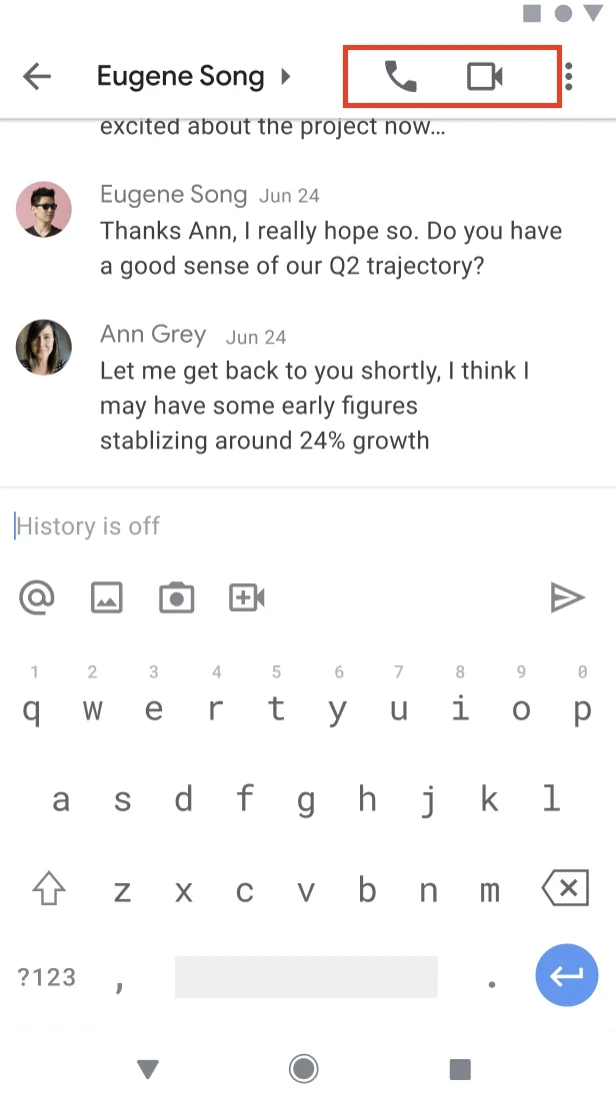
You can now start and join meetings or audio calls from 1:1 chats using Google Chat in Gmail on Android and iOS devices. At the moment, this feature will be available for 1:1 chats only.
To ring someone directly, select the video icon in the top right corner of a 1:1 chat. To join a call, select the video chip. While on a call, you’ll see a banner indicating the person you’re on a call with and the call duration and a Meet icon in the chat roster. Missed calls will be indicated with a red video icon within the conversation and the chat roster. Read more.
Start and join meetings and audio calls from 1:1 chats using Google Chat in Gmail on mobile
Edition: Available to all Google Workspace customers, as well as G Suite Basic and Business customers. Available to users with personal Google accounts
Who’s impacted: All end-users
You can now start and join meetings or audio calls from 1:1 chats using Google Chat in Gmail on Android and iOS devices. At the moment, this feature will be available for 1:1 chats only.
To ring someone directly, select the video icon in the top right corner of a 1:1 chat. To join a call, select the video chip. While on a call, you’ll see a banner indicating the person you’re on a call with and the call duration and a Meet icon in the chat roster. Missed calls will be indicated with a red video icon within the conversation and the chat roster. Read more.
Quicker access to more Workspace integrations in Google Chat
Edition: All
Who’s impacted: All end-users
While you’re having a conversation in Google Chat, you can now more easily take actions in other Google Workspace products. Simply hover over the + icon to the start of the text box to quickly see and access the menu of options. These options vary by context, and can include Drive, Docs, Sheets, Slides, Photos, and Calendar. Read more.
Quicker access to more Workspace integrations in Google Chat
Edition: All
Who’s impacted: All end-users
While you’re having a conversation in Google Chat, you can now more easily take actions in other Google Workspace products. Simply hover over the + icon to the start of the text box to quickly see and access the menu of options. These options vary by context, and can include Drive, Docs, Sheets, Slides, Photos, and Calendar. Read more.
Quicker access to more Workspace integrations in Google Chat
Edition: All
Who’s impacted: All end-users
While you’re having a conversation in Google Chat, you can now more easily take actions in other Google Workspace products. Simply hover over the + icon to the start of the text box to quickly see and access the menu of options. These options vary by context, and can include Drive, Docs, Sheets, Slides, Photos, and Calendar. Read more.
Quicker access to more Workspace integrations in Google Chat
Edition: All
Who’s impacted: All end-users
While you’re having a conversation in Google Chat, you can now more easily take actions in other Google Workspace products. Simply hover over the + icon to the start of the text box to quickly see and access the menu of options. These options vary by context, and can include Drive, Docs, Sheets, Slides, Photos, and Calendar. Read more.

Set tasks to repeat in Google Calendar
Edition: Available to all Google Workspace customers, as well as G Suite Basic and Business customers
Who’s impacted: All end users
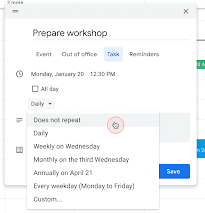
You can now set tasks to repeat in Google Calendar and customize the recurrence schedules, similar to other entry types in Calendar. This means you can:
Create tasks with recurrence rules
Edit the recurrence rule of an existing task
Set an "end condition" for a recurrence rule
We hope this change helps you get more things done in Google Workspace. Read more.
Set tasks to repeat in Google Calendar
Edition: Available to all Google Workspace customers, as well as G Suite Basic and Business customers
Who’s impacted: All end users
You can now set tasks to repeat in Google Calendar and customize the recurrence schedules, similar to other entry types in Calendar. This means you can:
Create tasks with recurrence rules
Edit the recurrence rule of an existing task
Set an "end condition" for a recurrence rule
We hope this change helps you get more things done in Google Workspace. Read more.
Prevent unwanted invitations from being added to your calendar
Edition: Available to Google Workspace Essentials, Business Starter, Business Standard, Business Plus, Frontline, Enterprise Standard, Enterprise Plus, Education Fundamentals, Education Plus, Nonprofits
Who’s impacted: All end users
We've improved the "Automatically Add invitations" setting to prevent unwanted invitations from being added to users' calendars. Users can choose to either always have invitations automatically added or never have them automatically added to their calendar unless they RSVP in the email event invitation. Read more.
Prevent unwanted invitations from being added to your calendar
Edition: Available to Google Workspace Essentials, Business Starter, Business Standard, Business Plus, Frontline, Enterprise Standard, Enterprise Plus, Education Fundamentals, Education Plus, Nonprofits
Who’s impacted: All end users
We've improved the "Automatically Add invitations" setting to prevent unwanted invitations from being added to users' calendars. Users can choose to either always have invitations automatically added or never have them automatically added to their calendar unless they RSVP in the email event invitation. Read more.
Easily see which is account you’re currently using Google Calendar on mobile
Edition: Available to all Google Workspace customers, as well as G Suite Basic and Business customers as well as to users with personal Google Accounts
Who’s impacted: All end users
We’ve added account profile pictures in the top corner of Google Calendar on mobile so you can confidently tell which account you’re currently using and easily toggle between accounts.
This visual cue will also make it easier to tell what account you’re creating an event under in Calendar on your Android and iOS device.
Clicking the profile picture will allow you to switch between enabled accounts, just as you do in other Google apps.
Note that you will still be able to see events for all accounts you’re logged into, or any other calendar account you added.
The account you’re active in will always be listed at the top of the accounts in the overflow menu.
Easily see which is account you’re currently using Google Calendar on mobile
Edition: Available to all Google Workspace customers, as well as G Suite Basic and Business customers as well as to users with personal Google Accounts
Who’s impacted: All end users
We’ve added account profile pictures in the top corner of Google Calendar on mobile so you can confidently tell which account you’re currently using and easily toggle between accounts.
This visual cue will also make it easier to tell what account you’re creating an event under in Calendar on your Android and iOS device.
Clicking the profile picture will allow you to switch between enabled accounts, just as you do in other Google apps.
Note that you will still be able to see events for all accounts you’re logged into, or any other calendar account you added.
The account you’re active in will always be listed at the top of the accounts in the overflow menu.

Enhanced content classification, governance, and DLP with Drive labels
Edition: Available to Google Workspace Essentials, Business Standard, Business Plus, Enterprise Essentials, Enterprise Standard, Enterprise Plus, Education Standard, Education Plus, and Nonprofits customers
Who’s impacted: Admins and end users
Earlier this year we announced a beta for two related features which can help categorize content and enhance content protection at scale. These two features are now generally available:
Drive labels: This renaming and update to the previously-announced Drive metadata feature enables admins to configure custom labels (formerly “metadata”) for a domain, and then enable users to apply these labels to files in Drive, helping ensure files are handled correctly.
Automated classification with Workspace Data loss prevention (DLP). Automated classification can help organizations automatically add Drive labels to content based on administrator-defined rules and predefined content detectors. Read more.

Enhanced content classification, governance, and DLP with Drive labels
Edition: Available to Google Workspace Essentials, Business Standard, Business Plus, Enterprise Essentials, Enterprise Standard, Enterprise Plus, Education Standard, Education Plus, and Nonprofits customers
Who’s impacted: Admins and end users
Earlier this year we announced a beta for two related features which can help categorize content and enhance content protection at scale. These two features are now generally available:
Drive labels: This renaming and update to the previously-announced Drive metadata feature enables admins to configure custom labels (formerly “metadata”) for a domain, and then enable users to apply these labels to files in Drive, helping ensure files are handled correctly.
Automated classification with Workspace Data loss prevention (DLP). Automated classification can help organizations automatically add Drive labels to content based on administrator-defined rules and predefined content detectors. Read more.
New notifications when Drive content violates abuse program policies
Edition: All
Who’s impacted: All end users
When a Google Drive file is identified as violating Google's Terms of Service or program policies, it may be restricted. When it’s restricted, you may see a flag next to the filename, you won’t be able to share it, and your file will no longer be publicly accessible, even to people who have the link. Read more.
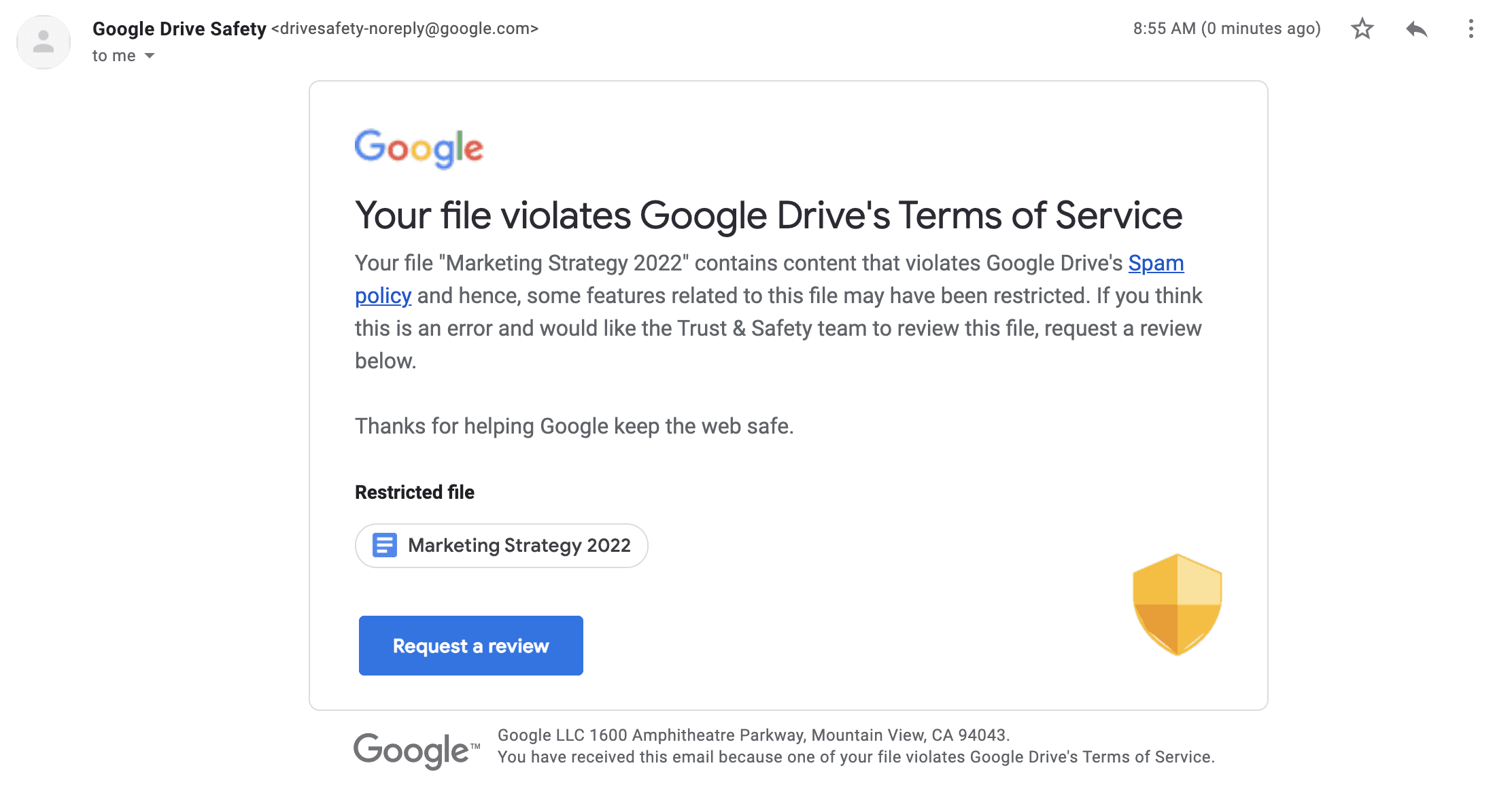
New notifications when Drive content violates abuse program policies
Edition: All
Who’s impacted: All end users
When a Google Drive file is identified as violating Google's Terms of Service or program policies, it may be restricted. When it’s restricted, you may see a flag next to the filename, you won’t be able to share it, and your file will no longer be publicly accessible, even to people who have the link. Read more.
New ways to customize tables in Google Docs
Edition: Available to all Google Workspace customers, as well as G Suite Basic and Business customers. Available to users with personal Google Accounts
Who’s impacted: All end users
We’re adding several new ways to customize tables in Google Docs. You can now:
Pin a table header row to repeat on each page
Designate that a row should not be split across pages
Quickly add and arrange columns and rows
Use a new table sidebar to manage table properties
New ways to customize tables in Google Docs
Edition: Available to all Google Workspace customers, as well as G Suite Basic and Business customers. Available to users with personal Google Accounts
Who’s impacted: All end users
We’re adding several new ways to customize tables in Google Docs. You can now:
Pin a table header row to repeat on each page
Designate that a row should not be split across pages
Quickly add and arrange columns and rows
Use a new table sidebar to manage table properties
Google Forms API now available in open beta
Edition: Developers can apply for access to the Google Forms API through our Early Adopter Program.
Who’s impacted: Admins and Developers
At Google Cloud Next 2021, we announced the Google Forms API Beta, which provides programmatic access for managing Google Forms and acting on responses— empowering developers to build powerful integrations on top of Forms.
The Google Forms API is now rolling out as an Open Beta which means developers who are part of our Early Adopter Program can make their integrations available to the public. We’ll no longer require individual end-user accounts to be allowlisted. Developers should keep in mind, however, that their integrations are in Beta.
Developers can apply to join our Early Adopter Program and begin developing using the Google Forms API by filling out this form. Read more.
Google Forms API now available in open beta
Edition: Developers can apply for access to the Google Forms API through our Early Adopter Program.
Who’s impacted: Admins and Developers
At Google Cloud Next 2021, we announced the Google Forms API Beta, which provides programmatic access for managing Google Forms and acting on responses— empowering developers to build powerful integrations on top of Forms.
The Google Forms API is now rolling out as an Open Beta which means developers who are part of our Early Adopter Program can make their integrations available to the public. We’ll no longer require individual end-user accounts to be allowlisted. Developers should keep in mind, however, that their integrations are in Beta.
Developers can apply to join our Early Adopter Program and begin developing using the Google Forms API by filling out this form. Read more.

Use new immersive backgrounds and styles for Google Meet on the web
Edition: Available to users with personal Google accounts
Who’s impacted: Admins and end users
We’re adding five new immersive backgrounds for Google Meet on the web. The backgrounds feature subtle animation that give your background life or change your lighting. Cafe and condo interiors will have various iterations, such as snowy or rainy weather, which will help dispersed teams better represent their current time zone and climate.
Additionally, we’re giving you more options to customize your video with various light and color filters and more stylised backgrounds. Read more.

Use new immersive backgrounds and styles for Google Meet on the web
Edition: Available to users with personal Google accounts
Who’s impacted: Admins and end users
We’re adding five new immersive backgrounds for Google Meet on the web. The backgrounds feature subtle animation that give your background life or change your lighting. Cafe and condo interiors will have various iterations, such as snowy or rainy weather, which will help dispersed teams better represent their current time zone and climate.
Additionally, we’re giving you more options to customize your video with various light and color filters and more stylised backgrounds. Read more.
New built-in interoperability between Google Meet and Cisco Webex
Edition: All
Who’s impacted: All end users
We’re introducing video conferencing interoperability for Google Meet with Cisco Webex, which will allow you to:
Join Webex meetings from Google Meet hardware devices
Join Google Meet calls from supported Cisco Webex devices
Please note that core video conferencing features are supported. Some advanced features, such as polls, breakout rooms, and dual-screen support, may not be available when using Meet hardware to join Webex calls and vice versa. Read more.
New built-in interoperability between Google Meet and Cisco Webex
Edition: All
Who’s impacted: All end users
We’re introducing video conferencing interoperability for Google Meet with Cisco Webex, which will allow you to:
Join Webex meetings from Google Meet hardware devices
Join Google Meet calls from supported Cisco Webex devices
Please note that core video conferencing features are supported. Some advanced features, such as polls, breakout rooms, and dual-screen support, may not be available when using Meet hardware to join Webex calls and vice versa. Read more.
Automatically move breakout room participants back to the original meeting
Edition: Available to Google Workspace Essentials, Business Standard, Business Plus, Enterprise Essentials, Enterprise Standard, Enterprise Plus, Nonprofits and Education Plus as well as G Suite Business customers
Who’s impacted: All end users
We’re introducing several improvements for breakout rooms in Google Meet. These improvements include:
The ability for meeting hosts and co-hosts to automatically move participants back to the main meeting room once breakout rooms end.
Better visual indicators for breakout room participants to indicate this movement.
Automatically move breakout room participants back to the original meeting
Edition: Available to Google Workspace Essentials, Business Standard, Business Plus, Enterprise Essentials, Enterprise Standard, Enterprise Plus, Nonprofits and Education Plus as well as G Suite Business customers
Who’s impacted: All end users
We’re introducing several improvements for breakout rooms in Google Meet. These improvements include:
The ability for meeting hosts and co-hosts to automatically move participants back to the main meeting room once breakout rooms end.
Better visual indicators for breakout room participants to indicate this movement.
Source: https://workspaceupdates.googleblog.com
Share To
Share To
Start with a 30-min call
Get a free
30-min AI strategy call
Free 30-minute scoping call
Engineers, not sales reps, on the call
Avg. response: under 4 hours, business days