Google Workspace Update: February 2025
Category
Category
Azure AI
Azure AI
Read
Read
3 min read
3 min read
Author
Author
GoPomelo Google Workspace Team
GoPomelo Google Workspace Team
Date
Date

Google Workspace Features Update Summary - February 2025
The summary of essential information about new features and improvements for Google Workspace customers in February 2025
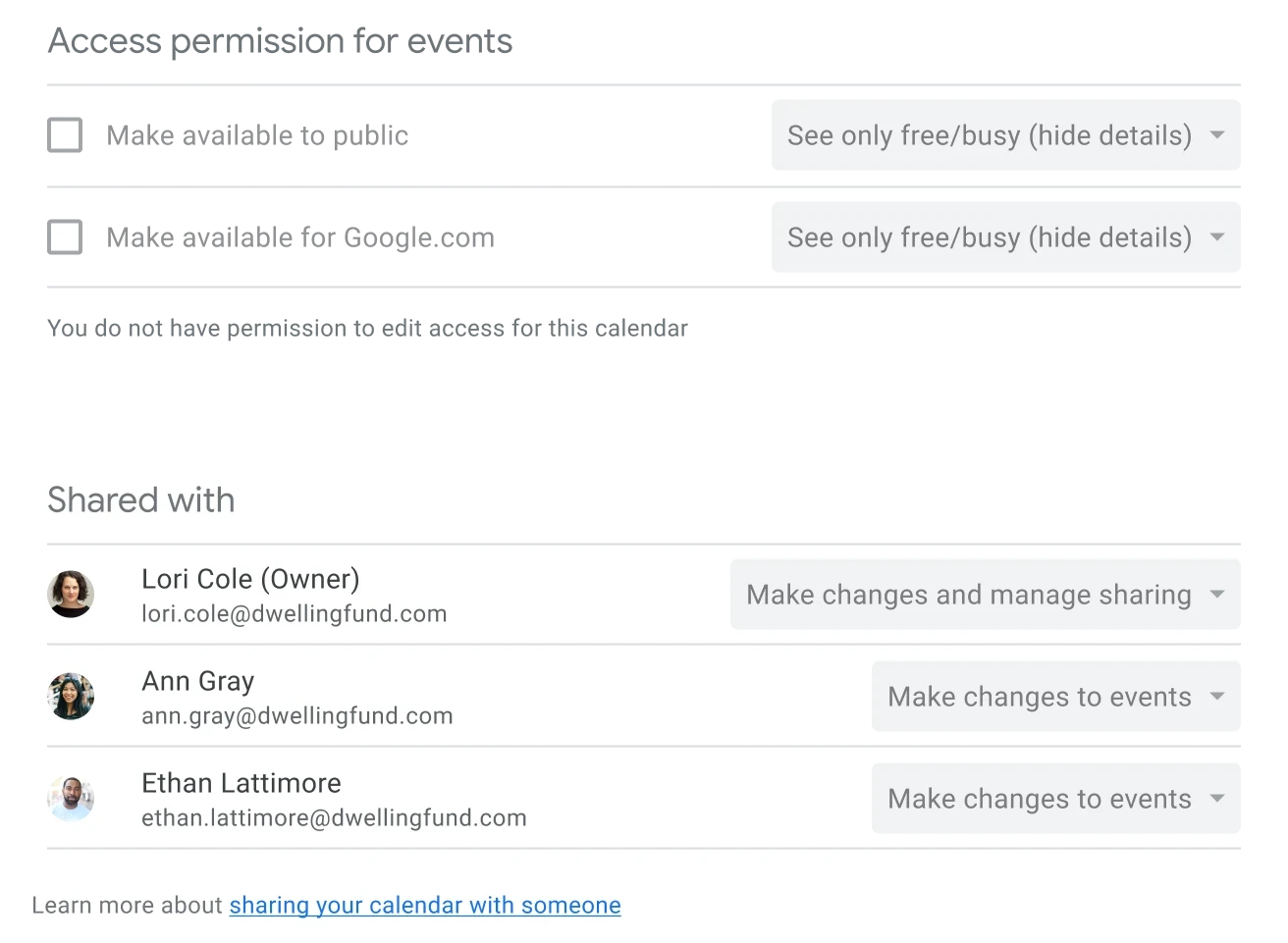
Know who an event is shared with when using shared Google Calendars
Users can have one of the following access permissions for shared Google Calendars:
“See only free/busy (hide details)”
“See all event details”
“Make changes to events”
“Make changes and manage sharing”
Availability: Available to all Google Workspace customers, Workspace Individual Subscribers, and users with personal Google accounts
Know who an event is shared with when using shared Google Calendars
Users can have one of the following access permissions for shared Google Calendars:
“See only free/busy (hide details)”
“See all event details”
“Make changes to events”
“Make changes and manage sharing”
Availability: Available to all Google Workspace customers, Workspace Individual Subscribers, and users with personal Google accounts

Developers can now add form field validation to Google Workspace add-ons and Google Chat app cards
Workspace add-ons and Chat app developers can add client-side input validation to Chat apps and add-ons. Read more.
Availability: Available to all Google Workspace customers

Developers can now add form field validation to Google Workspace add-ons and Google Chat app cards
Workspace add-ons and Chat app developers can add client-side input validation to Chat apps and add-ons. Read more.
Availability: Available to all Google Workspace customers
Create and vote on polls directly in Google Chat
In order to provide users with an easy way to gather feedback directly in their Google Chat conversations, we’re introducing a new Poll app. Read more.
Availability: Available to all Google Workspace customers that have enabled Chat apps in their domain, Workspace Individual Subscribers, and users with personal Google accounts

Create and vote on polls directly in Google Chat
In order to provide users with an easy way to gather feedback directly in their Google Chat conversations, we’re introducing a new Poll app. Read more.
Availability: Available to all Google Workspace customers that have enabled Chat apps in their domain, Workspace Individual Subscribers, and users with personal Google accounts
Improving the cover images experience in Google Docs
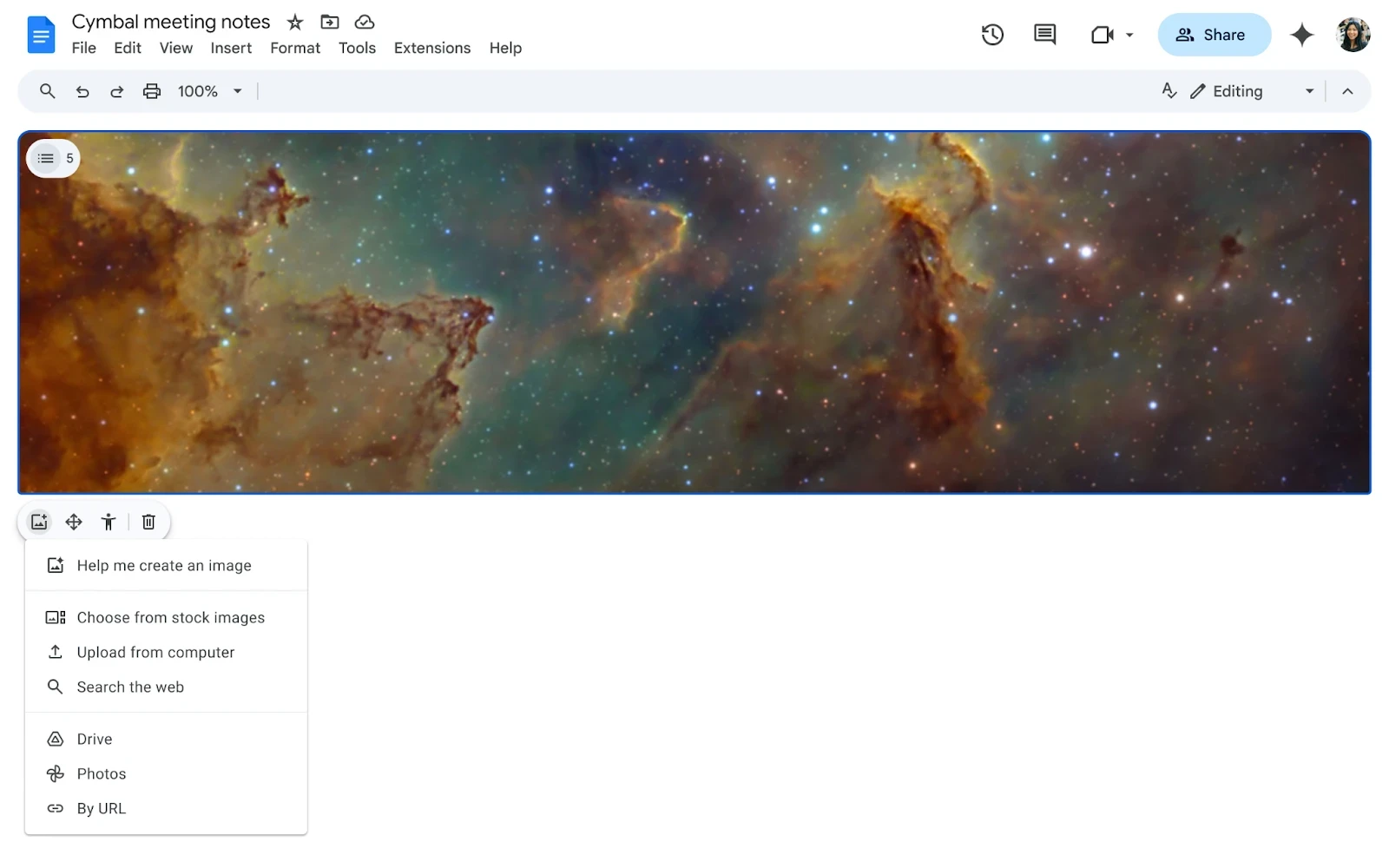
Last year, we made it easier for you to personalize and differentiate documents with full-bleed cover images that extend from one edge of your document to the other. Since then, many users have added cover images to help set the tone for a document, and today we’re announcing the few updates. In addition to the “Choose from stock images” and “Upload from computer” insertion options, users can now add images via:
Searching the web
Uploading from Drive
Importing from Google Photos
Pasting a URL
Availability: Available to all Google Workspace customers, Workspace Individual Subscribers, and users with personal Google accounts
Improving the cover images experience in Google Docs
Last year, we made it easier for you to personalize and differentiate documents with full-bleed cover images that extend from one edge of your document to the other. Since then, many users have added cover images to help set the tone for a document, and today we’re announcing the few updates. In addition to the “Choose from stock images” and “Upload from computer” insertion options, users can now add images via:
Searching the web
Uploading from Drive
Importing from Google Photos
Pasting a URL
Availability: Available to all Google Workspace customers, Workspace Individual Subscribers, and users with personal Google accounts

Easily migrate files from Microsoft OneDrive to Google Drive
You can migrate the files of up to 100 users at a time, including the files corresponding access permissions with shared members.
With the general availability release, we’ve also added additional settings which admins can use to:
Specify files to migrate within a certain date range.
Exclude specific file formats and large files.
Skip uploading an identity map and allow Google to automatically map source and target users instead.
Availability: Available to Google Workspace
Business Starter, Standard, and Plus
Enterprise Standard and Plus
Education Fundamentals, Standard, Plus, and the Teaching and Learning add-on
Essentials Starter and Essentials
Enterprise Essentials and Enterprise Essentials Plus
Nonprofits
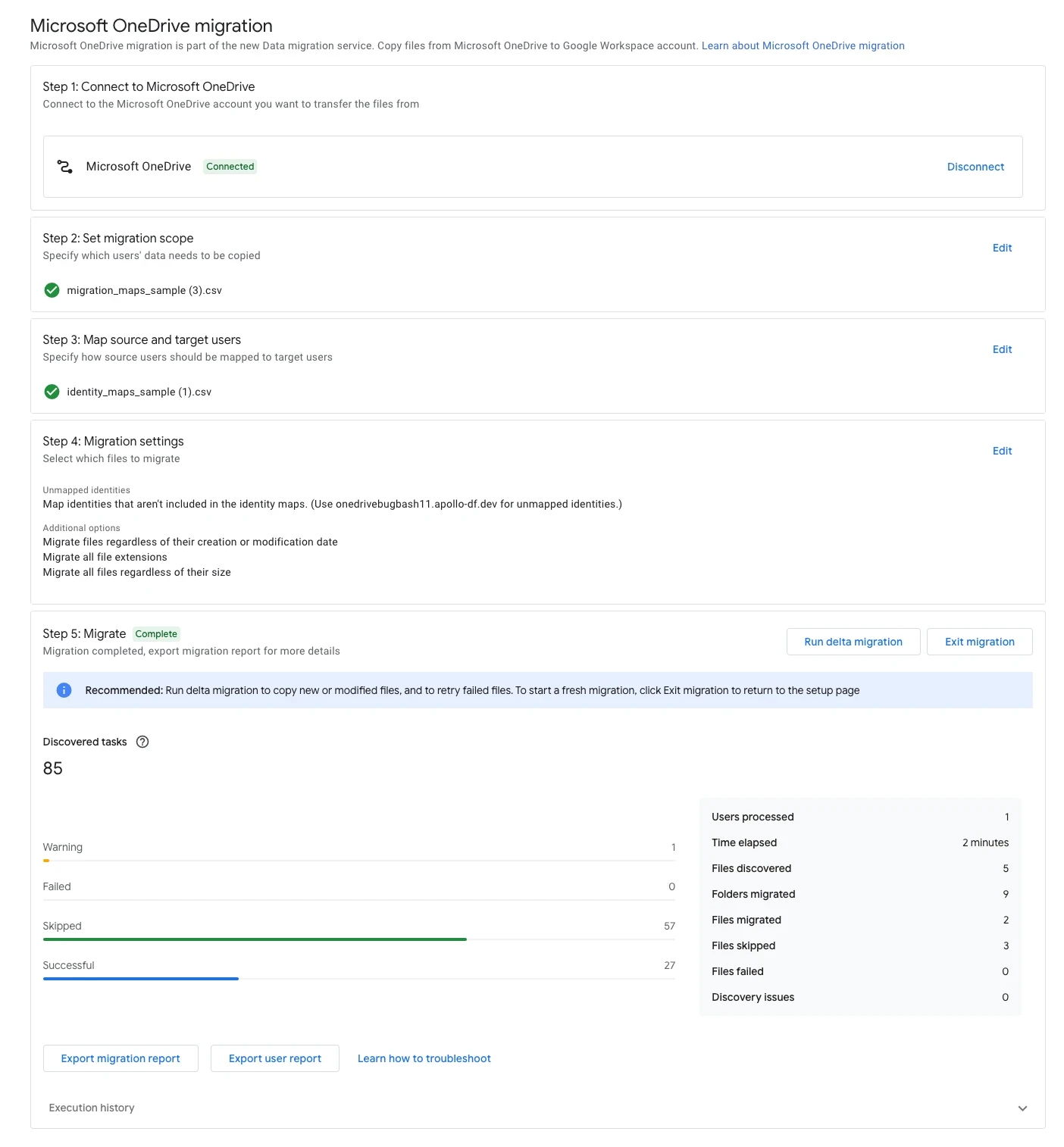
Easily migrate files from Microsoft OneDrive to Google Drive
You can migrate the files of up to 100 users at a time, including the files corresponding access permissions with shared members.
With the general availability release, we’ve also added additional settings which admins can use to:
Specify files to migrate within a certain date range.
Exclude specific file formats and large files.
Skip uploading an identity map and allow Google to automatically map source and target users instead.
Availability: Available to Google Workspace
Business Starter, Standard, and Plus
Enterprise Standard and Plus
Education Fundamentals, Standard, Plus, and the Teaching and Learning add-on
Essentials Starter and Essentials
Enterprise Essentials and Enterprise Essentials Plus
Nonprofits
Updating the access experience in Google Drive
Today, we’re excited to announce the general availability of this feature in shared drives and My Drive, which means that users can restrict access to their My Drive folders using the two options outlined below, and by 2026, we will simplify and align the restricted access principles for My Drive and shared drives. Read more.
Availability: Available to all Google Workspace customers, Workspace Individual Subscribers, and users with personal Google accounts
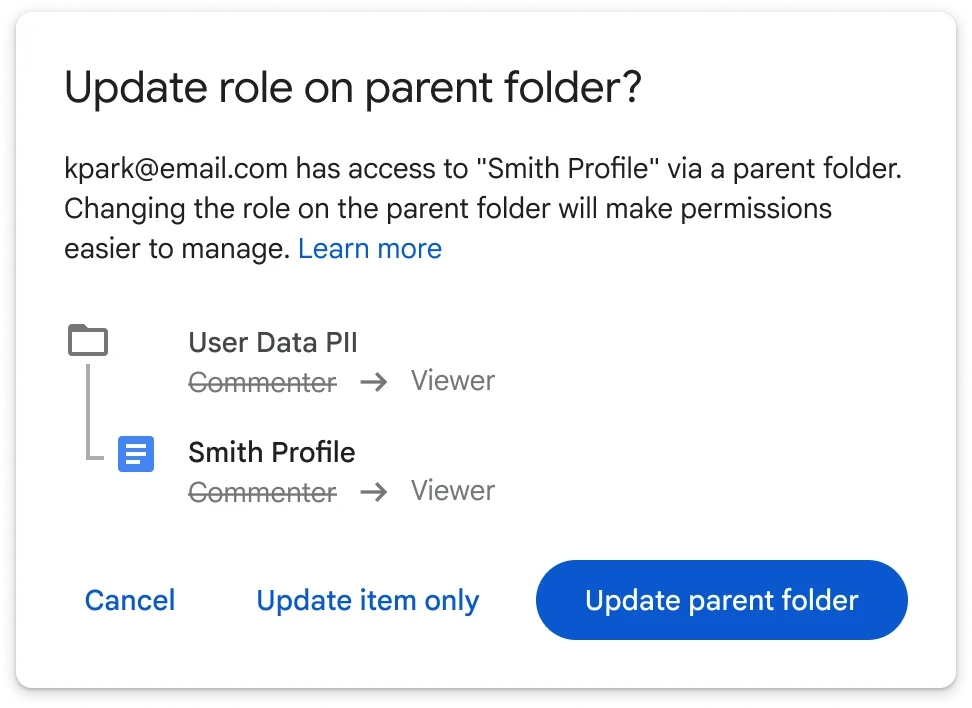
Updating the access experience in Google Drive
Today, we’re excited to announce the general availability of this feature in shared drives and My Drive, which means that users can restrict access to their My Drive folders using the two options outlined below, and by 2026, we will simplify and align the restricted access principles for My Drive and shared drives. Read more.
Availability: Available to all Google Workspace customers, Workspace Individual Subscribers, and users with personal Google accounts
Enhancing video navigation and accessibility with Google Drive video transcripts
Starting today, Drive users can now view and search transcripts for their videos. The transcript appears in a sidebar next to the video player and highlights the currently spoken text.
Availability: Available to all Google Workspace customers, Google Workspace Individual subscribers, and users with personal Google accounts

Enhancing video navigation and accessibility with Google Drive video transcripts
Starting today, Drive users can now view and search transcripts for their videos. The transcript appears in a sidebar next to the video player and highlights the currently spoken text.
Availability: Available to all Google Workspace customers, Google Workspace Individual subscribers, and users with personal Google accounts

Data classification labels in Gmail are now available on all Android and iOS devices
In November 2024, we launched an open beta for data classification labels in Gmail. Beginning today, data classification labels will be available when using the Gmail app on mobile Android and iOS devices. Expanding data classification labels to mobile enables organizations to protect their data whether their users are sharing and accessing information from desktop devices or from mobile devices in the field or on-the-go. Read more.
Availability: The Label Manager and manual classification is available to Google Workspace:
Frontline Starter and Standard
Business Standard and Plus
Enterprise Standard and Plus
Education Standard and Education Plus
Essentials, Enterprise Essentials, and Enterprise Essentials Plus
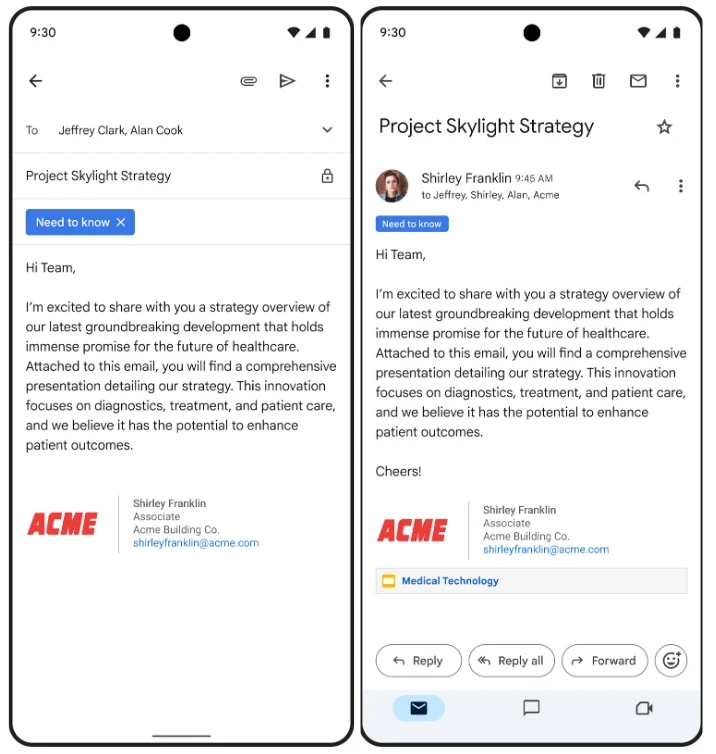
Data classification labels in Gmail are now available on all Android and iOS devices
In November 2024, we launched an open beta for data classification labels in Gmail. Beginning today, data classification labels will be available when using the Gmail app on mobile Android and iOS devices. Expanding data classification labels to mobile enables organizations to protect their data whether their users are sharing and accessing information from desktop devices or from mobile devices in the field or on-the-go. Read more.
Availability: The Label Manager and manual classification is available to Google Workspace:
Frontline Starter and Standard
Business Standard and Plus
Enterprise Standard and Plus
Education Standard and Education Plus
Essentials, Enterprise Essentials, and Enterprise Essentials Plus

Google Meet adds more screen reader options for in-meeting reactions
To improve access for users with vision disabilities, we are adding several more options for how reactions in Google Meet are experienced through screen readers. Read more.
Availability: Available for Google Workspace customers and users with personal Google accounts
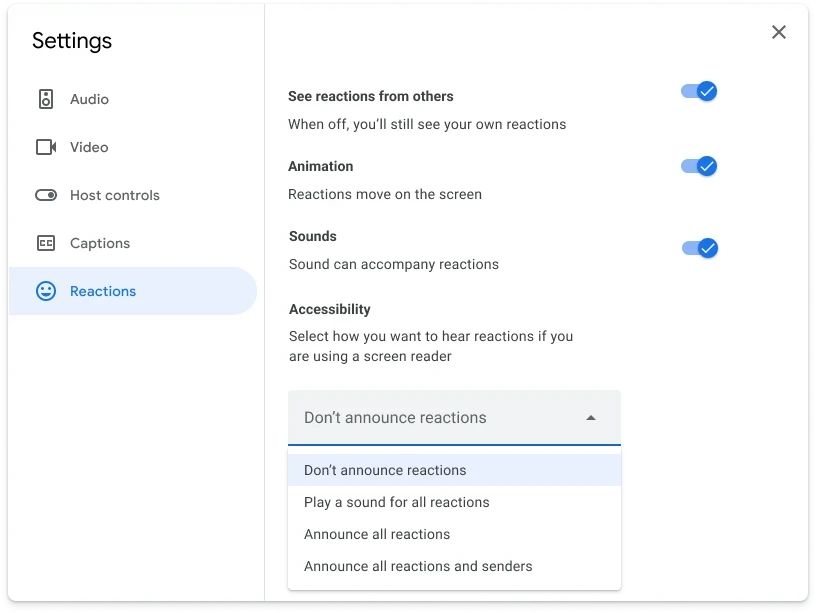
Google Meet adds more screen reader options for in-meeting reactions
To improve access for users with vision disabilities, we are adding several more options for how reactions in Google Meet are experienced through screen readers. Read more.
Availability: Available for Google Workspace customers and users with personal Google accounts

Easily convert data to people chips and update chip format in Google Sheets
Similar to the functionality in Google Sheets that helps you easily convert data to dropdown chips, you can now use bulk chip conversion for people chips. Read more.
Availability: Available to all Google Workspace customers, Google Workspace Individual subscribers, and users with personal Google accounts

Easily convert data to people chips and update chip format in Google Sheets
Similar to the functionality in Google Sheets that helps you easily convert data to dropdown chips, you can now use bulk chip conversion for people chips. Read more.
Availability: Available to all Google Workspace customers, Google Workspace Individual subscribers, and users with personal Google accounts
Source: https://workspaceupdates.googleblog.com
Share To
Share To
Start with a 30-min call
Get a free
30-min AI strategy call
Free 30-minute scoping call
Engineers, not sales reps, on the call
Avg. response: under 4 hours, business days