Google Workspace Features Update: Jun 2021
Category
Category
Azure AI
Azure AI
Read
Read
5 min read
5 min read
Author
Author
GoPomelo Google Workspace Team
GoPomelo Google Workspace Team
Date
Date

Google Workspace (formerly G Suite) Features Update Summary - June 2021
The summary of essential information about new features and improvements for Google Workspace customers in June 2021.

Important changes to how the Google Calendar API manages and limits queries
Edition: All
Who’s impacted: Admins only
There has been a change to how the Google Calendar API manages usage. Previously, Calendar API queries were monitored and limited daily. These queries are now monitored and limited on a per-minute basis. Read more.
Important changes to how the Google Calendar API manages and limits queries
Edition: All
Who’s impacted: Admins only
There has been a change to how the Google Calendar API manages usage. Previously, Calendar API queries were monitored and limited daily. These queries are now monitored and limited on a per-minute basis. Read more.

Evolving Rooms in Google Chat to Spaces to create a richer, more collaborative experience
Edition: Available to Business Starter, Business Standard, Business Plus, Enterprise Standard, Enterprise Plus, Education Fundamentals, Education Plus, Nonprofits
Who’s impacted: All end users
Today, we’re announcing new forthcoming innovations in Google Chat to help teams do their best work in the hybrid work world, as many of us begin a return to the office. In addition, we will also introduce a more streamlined and flexible user interface that helps people and groups more easily stay organized and balance focus and multitasking. Later this year, we’ll evolve the Rooms experience in Google Chat to Spaces, a dedicated place to organize people, topics, and projects in Google Workspace. Read more.

Evolving Rooms in Google Chat to Spaces to create a richer, more collaborative experience
Edition: Available to Business Starter, Business Standard, Business Plus, Enterprise Standard, Enterprise Plus, Education Fundamentals, Education Plus, Nonprofits
Who’s impacted: All end users
Today, we’re announcing new forthcoming innovations in Google Chat to help teams do their best work in the hybrid work world, as many of us begin a return to the office. In addition, we will also introduce a more streamlined and flexible user interface that helps people and groups more easily stay organized and balance focus and multitasking. Later this year, we’ll evolve the Rooms experience in Google Chat to Spaces, a dedicated place to organize people, topics, and projects in Google Workspace. Read more.
Improved search in Google Chat on mobile
Edition: All
Who’s impacted: All end users
You can now search Google Chat content faster by quickly editing down your search results using interactive filters on mobile. These filters help you find artifacts like files and links more easily. These features are available now on Android. They will be available on iOS and Web by the end of July 2021. Read more.

Filter using different search chips in Chat
Improved search in Google Chat on mobile
Edition: All
Who’s impacted: All end users
You can now search Google Chat content faster by quickly editing down your search results using interactive filters on mobile. These filters help you find artifacts like files and links more easily. These features are available now on Android. They will be available on iOS and Web by the end of July 2021. Read more.
Filter using different search chips in Chat

Filters will be visible below chat search bar
Filters will be visible below chat search bar

Use the ‘Said in’ filter to narrow down to the conversations that matter
Use the ‘Said in’ filter to narrow down to the conversations that matter
Enable audit logs for Google Cloud Search
Edition: Available to Google Workspace Enterprise Plus and Google Cloud Search customers
Who’s impacted: Admins only
You can now enable audit logging for Google Cloud Search APIs for improved tracking of usage data. With deeper tracking, it's now possible to build richer analytics on top of Cloud Search usage to make data-driven decisions and improve your user’s search experience. Read more.
Enable audit logs for Google Cloud Search
Edition: Available to Google Workspace Enterprise Plus and Google Cloud Search customers
Who’s impacted: Admins only
You can now enable audit logging for Google Cloud Search APIs for improved tracking of usage data. With deeper tracking, it's now possible to build richer analytics on top of Cloud Search usage to make data-driven decisions and improve your user’s search experience. Read more.

Customize the color of your folders and shortcuts to folders in Google Drive
Edition: All
Who’s impacted: End-users and developers
You can now customize the color of folders in shared drives, and shortcuts to folders. Previously, it was only possible to customize the color of folders in My Drive. Read more.

Customize the color of your folders and shortcuts to folders in Google Drive
Edition: All
Who’s impacted: End-users and developers
You can now customize the color of folders in shared drives, and shortcuts to folders. Previously, it was only possible to customize the color of folders in My Drive. Read more.
Enhanced content classification and DLP with Drive labels beta
Edition: All
Who’s impacted: Admins and end-users
We’re expanding betas for two related features which can help categorize content and enhance content protection at scale. Specifically, we’re adding:
Drive labels
Automated classification and Drive data loss prevention (DLP) integration.

Enhanced content classification and DLP with Drive labels beta
Edition: All
Who’s impacted: Admins and end-users
We’re expanding betas for two related features which can help categorize content and enhance content protection at scale. Specifically, we’re adding:
Drive labels
Automated classification and Drive data loss prevention (DLP) integration.
Get more control over how files can be shared with trust rules for Google Drive beta
Edition: All
Who’s impacted: Admins and end-users
Because sharing ideas and information is at the heart of trusted collaboration, it’s critical that you have the ability to powerfully and precisely manage your files. That’s why we’re introducing a beta for trust rules for Google Drive. Trust rules is a new security feature that allows admins to set fine-grained rules defining whom their users can collaborate within Drive, both within and outside of their organization. Read more.

Get more control over how files can be shared with trust rules for Google Drive beta
Edition: All
Who’s impacted: Admins and end-users
Because sharing ideas and information is at the heart of trusted collaboration, it’s critical that you have the ability to powerfully and precisely manage your files. That’s why we’re introducing a beta for trust rules for Google Drive. Trust rules is a new security feature that allows admins to set fine-grained rules defining whom their users can collaborate within Drive, both within and outside of their organization. Read more.

New ways to discover and navigate comments in Google Sheets
Edition: All
Who’s impacted: All end-users
Now in Google Sheets, you can:
Review comments and conversation threads in a sidebar.
Apply filters to find the most relevant comments for getting your work done when a document is highly collaborative.
Page through comment threads in a document in the comment overlay.
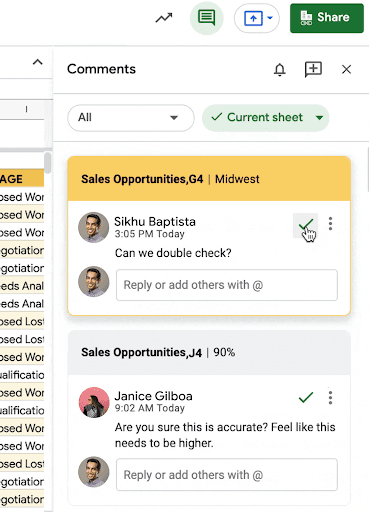
Take action directly in the sidebar when tasks are complete, or conversations have been resolved.
New ways to discover and navigate comments in Google Sheets
Edition: All
Who’s impacted: All end-users
Now in Google Sheets, you can:
Review comments and conversation threads in a sidebar.
Apply filters to find the most relevant comments for getting your work done when a document is highly collaborative.
Page through comment threads in a document in the comment overlay.
Take action directly in the sidebar when tasks are complete, or conversations have been resolved.

Use the new navigator to progress through comments in the spreadsheet.
Use the new navigator to progress through comments in the spreadsheet.
Update to Sheets API v4 migration timeline
Edition: All
Who’s impacted: Admins and developers
In 2019, we announced the retirement of the Sheets v3 API. All components of the Sheets v3 API will be turned down on June 8, 2021. Read more.
Update to Sheets API v4 migration timeline
Edition: All
Who’s impacted: Admins and developers
In 2019, we announced the retirement of the Sheets v3 API. All components of the Sheets v3 API will be turned down on June 8, 2021. Read more.

Changes to Google Workspace storage policies starting June 1, 2021
Edition: All
Who’s impacted: Admins and end-users
Starting June 1, 2021, any new photos or videos uploaded to Google Photos or Google Drive in High quality will count toward the storage limits for users in your domain. Currently, only photos and videos uploaded in Original quality count toward storage quotas. Please note that any photos or videos uploaded in High quality prior to June 1, 2021, will not be impacted by this change and will not count toward storage limits. Read more.
Changes to Google Workspace storage policies starting June 1, 2021
Edition: All
Who’s impacted: Admins and end-users
Starting June 1, 2021, any new photos or videos uploaded to Google Photos or Google Drive in High quality will count toward the storage limits for users in your domain. Currently, only photos and videos uploaded in Original quality count toward storage quotas. Please note that any photos or videos uploaded in High quality prior to June 1, 2021, will not be impacted by this change and will not count toward storage limits. Read more.
View domain approved Google Workspace Add-ons in the Google Workspace Marketplace
Edition: All
Who’s impacted: Admins and end-users
We’re adding an “Approved for You” section to the Google Workspace Marketplace where users can quickly see and install applications that have been approved and allow listed by their admins. We hope this improvement makes it easier for users to find and install add-ons approved by their admin. Read more.

View domain approved Google Workspace Add-ons in the Google Workspace Marketplace
Edition: All
Who’s impacted: Admins and end-users
We’re adding an “Approved for You” section to the Google Workspace Marketplace where users can quickly see and install applications that have been approved and allow listed by their admins. We hope this improvement makes it easier for users to find and install add-ons approved by their admin. Read more.

Replace your background with a video in Google Meet
Edition: All
Who’s impacted: Admins and end-users
In addition to replacing your Google Meet background with a static image, you can now replace your background with a video. At the moment, you can select from three Google made videos: a classroom, a party, and a forest — more options will be available soon. Read more.

Replace your background with a video in Google Meet
Edition: All
Who’s impacted: Admins and end-users
In addition to replacing your Google Meet background with a static image, you can now replace your background with a video. At the moment, you can select from three Google made videos: a classroom, a party, and a forest — more options will be available soon. Read more.
Replace your background with a video in Google Meet, now on Android
Edition: All
Who’s impacted: All end-users
You can now blur or replace your background with an image in Google Meet on Android. You can choose from Google’s hand-picked images, which include office spaces, landscapes, and abstract backgrounds. Support for uploading your own image on Android and support for iOS will be coming soon; we’ll announce on the Google Workspace Updates blog when they become available. This feature was already available on the web. Read more.

Replace your background with a video in Google Meet, now on Android
Edition: All
Who’s impacted: All end-users
You can now blur or replace your background with an image in Google Meet on Android. You can choose from Google’s hand-picked images, which include office spaces, landscapes, and abstract backgrounds. Support for uploading your own image on Android and support for iOS will be coming soon; we’ll announce on the Google Workspace Updates blog when they become available. This feature was already available on the web. Read more.
Background noise reduction in Google Meet now available to more users and turning on by default
Edition: All
Who’s impacted: All end-users
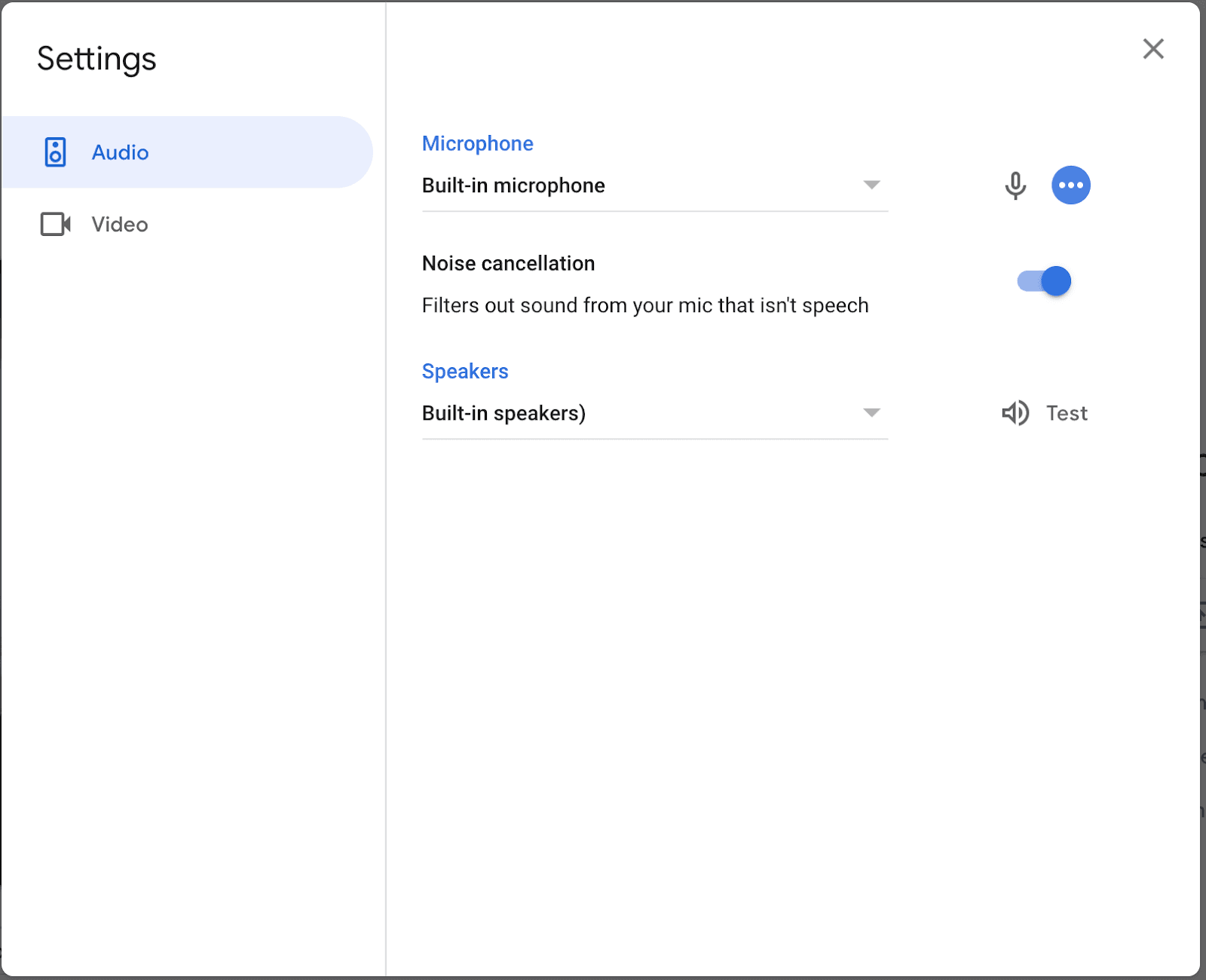
To help limit distractions in your video call, Google Meet can remove background noises such as typing, closing a door, or the sounds of a nearby construction site. Last year, we made noise cancellation available to Google Workspace Enterprise Plus and Education Plus customers, now, we’re making two additional updates to the feature’s availability:
Adding availability for more users in other Google Workspace Editions
Starting August 9, 2021, it'll be turned on by default for Enterprise Plus users
Background noise reduction in Google Meet now available to more users and turning on by default
Edition: All
Who’s impacted: All end-users
To help limit distractions in your video call, Google Meet can remove background noises such as typing, closing a door, or the sounds of a nearby construction site. Last year, we made noise cancellation available to Google Workspace Enterprise Plus and Education Plus customers, now, we’re making two additional updates to the feature’s availability:
Adding availability for more users in other Google Workspace Editions
Starting August 9, 2021, it'll be turned on by default for Enterprise Plus users
New admin setting for who can join Google Meet calls in your domain, and which calls people in your domain can join
Edition: All
Who’s impacted: Admins and end-users
We’re adding new settings in the Admin console which allow admins to control who can join Google Meet calls in their domain, and which calls people in their domain can join. Read more.
New admin setting for who can join Google Meet calls in your domain, and which calls people in your domain can join
Edition: All
Who’s impacted: Admins and end-users
We’re adding new settings in the Admin console which allow admins to control who can join Google Meet calls in their domain, and which calls people in their domain can join. Read more.
TLS support for Google Meet
Edition: All
Who’s impacted: Admins only
We’re adding a new network option to help you ensure higher quality video meetings with Google Meet. Now, in addition to the range of official, fixed IP addresses in Google Workspace domains and non-Google Workspace users, Google Meet supports TLS over port 443. Read more.
TLS support for Google Meet
Edition: All
Who’s impacted: Admins only
We’re adding a new network option to help you ensure higher quality video meetings with Google Meet. Now, in addition to the range of official, fixed IP addresses in Google Workspace domains and non-Google Workspace users, Google Meet supports TLS over port 443. Read more.
Improvements to Hand Raise in Google Meet, including automatic hand lowering, better notifications, and more
Edition: All
Who’s impacted: All end-users
We’re improving the hand raise feature in Meet so that it is easier to notice and address raised hands. Read more.

Improvements to Hand Raise in Google Meet, including automatic hand lowering, better notifications, and more
Edition: All
Who’s impacted: All end-users
We’re improving the hand raise feature in Meet so that it is easier to notice and address raised hands. Read more.
Stronger data security and privacy with Google Workspace Client-side encryption beta
Edition: All
Who’s impacted: Admins only
Today we announced the beta for Google Workspace Client-side encryption, which is available to Google Workspace Enterprise Plus and Google Workspace Education Plus customers. The beta will be available for Google Drive, Docs, Sheets, and Slides, with support for all file types in Drive including Office files, PDFs, and more. Read more.

Stronger data security and privacy with Google Workspace Client-side encryption beta
Edition: All
Who’s impacted: Admins only
Today we announced the beta for Google Workspace Client-side encryption, which is available to Google Workspace Enterprise Plus and Google Workspace Education Plus customers. The beta will be available for Google Drive, Docs, Sheets, and Slides, with support for all file types in Drive including Office files, PDFs, and more. Read more.
Use the Classic Sites Manager to download archived backups and control editing of sites in bulk
Edition: All
Who’s impacted: All end-users
To help Admins and end-users manage the transition to new Sites, we introduced the Classic Sites Manager in 2020. In May 2021, we added the ability to bulk delete, restore, and update the ownership of sites. Today, we’re adding additional new features to the Classic Sites Manager for Admins:
Bulk download an archive of a selection of sites via Takeout,
Bulk disable and/or re-enable the ability for users to edit a selection of sites.

Use the Classic Sites Manager to download archived backups and control editing of sites in bulk
Edition: All
Who’s impacted: All end-users
To help Admins and end-users manage the transition to new Sites, we introduced the Classic Sites Manager in 2020. In May 2021, we added the ability to bulk delete, restore, and update the ownership of sites. Today, we’re adding additional new features to the Classic Sites Manager for Admins:
Bulk download an archive of a selection of sites via Takeout,
Bulk disable and/or re-enable the ability for users to edit a selection of sites.
Source: https://workspaceupdates.googleblog.com
Share To
Share To
Start with a 30-min call
Get a free
30-min AI strategy call
Free 30-minute scoping call
Engineers, not sales reps, on the call
Avg. response: under 4 hours, business days