Google Workspace Features Update: March 2023
Category
Category
Azure AI
Azure AI
Read
Read
4 min read
4 min read
Author
Author
GoPomelo Google Workspace Team
GoPomelo Google Workspace Team
Date
Date

Google Workspace Features Update Summary - March 2023
The summary of essential information about new features and improvements for Google Workspace customers in March 2023.
Save time with suggested work locations in Google Calendar
Edition: Available to all Google Workspace customers and users with personal Google Accounts. Not available to legacy G Suite Basic and Business customers
Who’s impacted: Admins and end-users
Since announcing the ability to share where you’re working from directly on Google Calendar, we’ve introduced features that enable better planning around in-person collaboration and meeting coordination, especially in a hybrid work environment. A few include:
Office Building support for Working Locations
Encouraging Working Location coverage across organizations
Increasing efficiency through better meeting room management with room release
Today, we’re adding an update that helps you easily define your work location much quicker with suggested working locations based on your recent locations. Read more.

Save time with suggested work locations in Google Calendar
Edition: Available to all Google Workspace customers and users with personal Google Accounts. Not available to legacy G Suite Basic and Business customers
Who’s impacted: Admins and end-users
Since announcing the ability to share where you’re working from directly on Google Calendar, we’ve introduced features that enable better planning around in-person collaboration and meeting coordination, especially in a hybrid work environment. A few include:
Office Building support for Working Locations
Encouraging Working Location coverage across organizations
Increasing efficiency through better meeting room management with room release
Today, we’re adding an update that helps you easily define your work location much quicker with suggested working locations based on your recent locations. Read more.

Introducing new space manager capabilities in Google Chat
Edition: Available to all Google Workspace customers, as well as legacy G Suite Basic and Business customers
Who’s impacted: All end-users
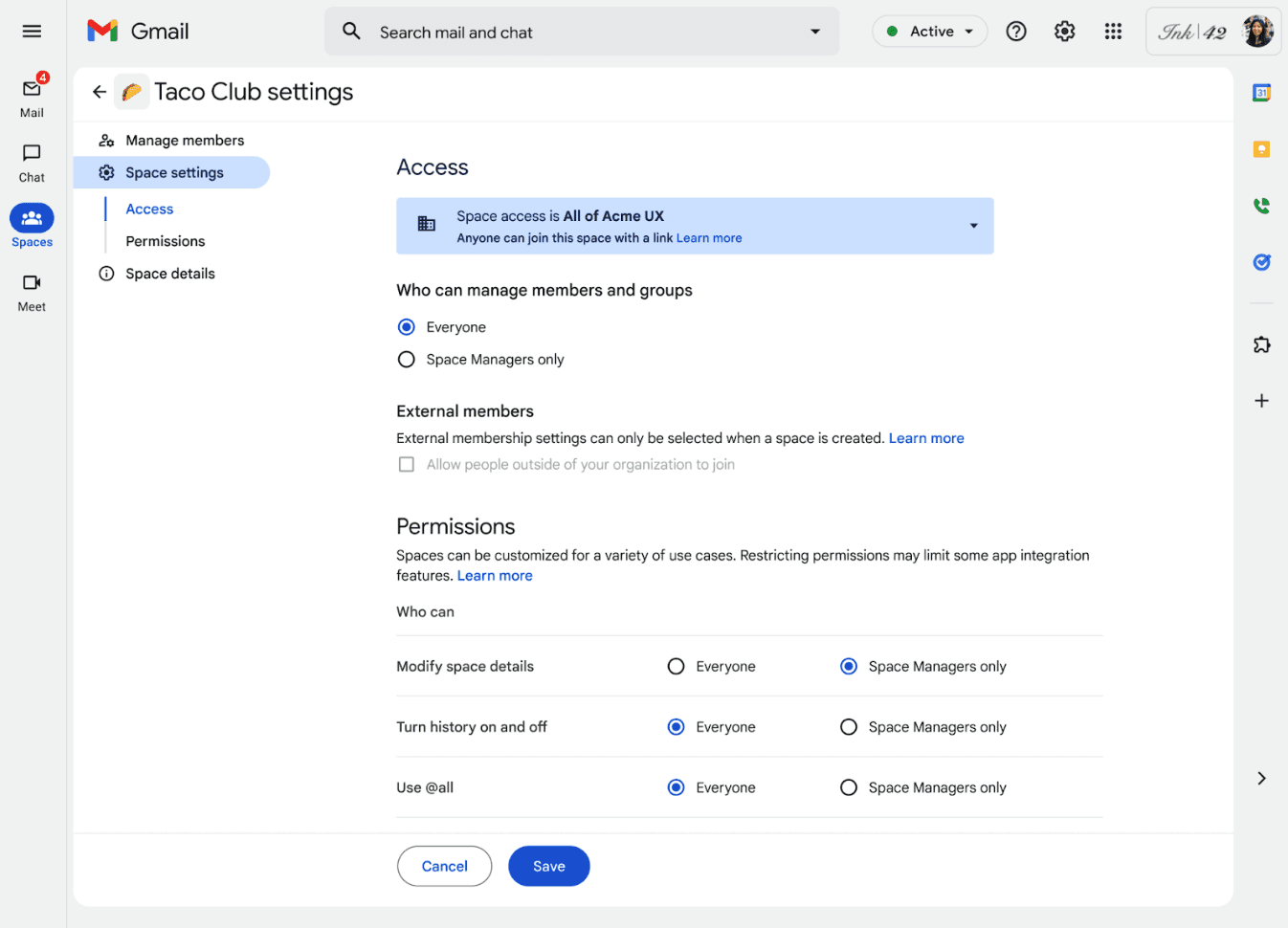
Starting today, space managers will now have additional capabilities to ensure effective conversations take place in spaces:
Space configuration: enables space managers to choose if members can change space details, such as name, icon, description, and guidelines, or turn Chat history on/off for the space.
Member management: allows space managers to decide if members can add or remove members or groups to a space.
Conversation moderation: authorizes space managers to determine whether members can use @all in a space.
Introducing new space manager capabilities in Google Chat
Edition: Available to all Google Workspace customers, as well as legacy G Suite Basic and Business customers
Who’s impacted: All end-users
Starting today, space managers will now have additional capabilities to ensure effective conversations take place in spaces:
Space configuration: enables space managers to choose if members can change space details, such as name, icon, description, and guidelines, or turn Chat history on/off for the space.
Member management: allows space managers to decide if members can add or remove members or groups to a space.
Conversation moderation: authorizes space managers to determine whether members can use @all in a space.

Improvements to content organization in Google Docs
Edition: Available to all Google Workspace customers, as well as legacy G Suite Basic and Business customers. Available to users with personal Google Accounts
Who’s impacted: Admin and end Users
We’re rolling out improvements to the formatting and customization options for tables of contents in Google Docs. You now have the options to:
Toggle between three default styles
Toggle page numbers
Toggle tab leader styling (adds lines between a heading and the page number)
Include and indent headings based on levels
With these enhanced customizations, we hope this highly requested feature refines titles and headings to personalize the content of your document. Read more.

Improvements to content organization in Google Docs
Edition: Available to all Google Workspace customers, as well as legacy G Suite Basic and Business customers. Available to users with personal Google Accounts
Who’s impacted: Admin and end Users
We’re rolling out improvements to the formatting and customization options for tables of contents in Google Docs. You now have the options to:
Toggle between three default styles
Toggle page numbers
Toggle tab leader styling (adds lines between a heading and the page number)
Include and indent headings based on levels
With these enhanced customizations, we hope this highly requested feature refines titles and headings to personalize the content of your document. Read more.

New updates for Google Meet on Poly Android-based appliances
Edition: Available on Poly X30, X50 and X70 with support for additional Poly devices will be added over time. Available to all Google Workspace customers, as well as legacy G Suite Basic and Business customers.
Who’s impacted: Admins only
We are rolling out updates to Google Meet to support our upcoming launch of Google Meet on Poly Android-based appliances. Within the Google admin console, admins can enroll Poly devices and include reporting of these new appliances. The Google Meet hardware experience will become available in the upcoming Poly OS 4.0 update as part of the Poly Studio X series family. Read more.
New updates for Google Meet on Poly Android-based appliances
Edition: Available on Poly X30, X50 and X70 with support for additional Poly devices will be added over time. Available to all Google Workspace customers, as well as legacy G Suite Basic and Business customers.
Who’s impacted: Admins only
We are rolling out updates to Google Meet to support our upcoming launch of Google Meet on Poly Android-based appliances. Within the Google admin console, admins can enroll Poly devices and include reporting of these new appliances. The Google Meet hardware experience will become available in the upcoming Poly OS 4.0 update as part of the Poly Studio X series family. Read more.
External label for Google Meet participants
Edition: Available to Google Workspace Essentials, Business Starter, Business Standard, Business Plus, Enterprise Essentials, Enterprise Standard, Enterprise Plus, Education Fundamentals, Education Plus, Education Standard, the Teaching and Learning Upgrade, Frontline, and Nonprofits customers
Who’s impacted: Admins and end users
"External” labels will be available in Google Meet. Users will see a label in the top-left corner of their meeting screen indicating that participants who are external to the meeting host’s domain have joined the meeting. In the people panel, external participants will be denoted with the same icon. Read more.

External label for Google Meet participants
Edition: Available to Google Workspace Essentials, Business Starter, Business Standard, Business Plus, Enterprise Essentials, Enterprise Standard, Enterprise Plus, Education Fundamentals, Education Plus, Education Standard, the Teaching and Learning Upgrade, Frontline, and Nonprofits customers
Who’s impacted: Admins and end users
"External” labels will be available in Google Meet. Users will see a label in the top-left corner of their meeting screen indicating that participants who are external to the meeting host’s domain have joined the meeting. In the people panel, external participants will be denoted with the same icon. Read more.
Provide custom Google Meet background images for your users
Edition: Available to all Google Workspace customers, as well as legacy G Suite Basic and Business customers
Who’s impacted: Admins and end users
We’ve heard from our users who have backgrounds that match your brand guidelines are important for visual polish during critical meetings. Now, admins can now provide a set of images for the background replacement feature in Google Meet. This will enable users to easily select an image that properly represents their company's specific brand and style. Read more.

Provide custom Google Meet background images for your users
Edition: Available to all Google Workspace customers, as well as legacy G Suite Basic and Business customers
Who’s impacted: Admins and end users
We’ve heard from our users who have backgrounds that match your brand guidelines are important for visual polish during critical meetings. Now, admins can now provide a set of images for the background replacement feature in Google Meet. This will enable users to easily select an image that properly represents their company's specific brand and style. Read more.

Google Keep notes now available on home screen of Android devices
Edition: Available to all Google Workspace customers, as well as legacy G Suite Basic and Business customers. Available to users with personal Google Accounts
Who’s impacted: All end-users
In addition to dual pane view, drag out, and a number of other features supporting the mission to provide a top-class user experience on Android devices when using Google Keep, we’re introducing the Keep single note widget.
With this new feature, you can “pin” a note or list to your home screen and edit them in the Keep app with a single tap. Lists enable you to toggle checkboxes directly on the note without having to open the Keep app. Also, your notes and lists will reflect any background colors and reminders present within the Keep app. Finally, a collaborator icon will appear at the bottom of the note to indicate if it is a shared note between two or more people. Read more.

Google Keep notes now available on home screen of Android devices
Edition: Available to all Google Workspace customers, as well as legacy G Suite Basic and Business customers. Available to users with personal Google Accounts
Who’s impacted: All end-users
In addition to dual pane view, drag out, and a number of other features supporting the mission to provide a top-class user experience on Android devices when using Google Keep, we’re introducing the Keep single note widget.
With this new feature, you can “pin” a note or list to your home screen and edit them in the Keep app with a single tap. Lists enable you to toggle checkboxes directly on the note without having to open the Keep app. Also, your notes and lists will reflect any background colors and reminders present within the Keep app. Finally, a collaborator icon will appear at the bottom of the note to indicate if it is a shared note between two or more people. Read more.

Improving Filters in Google Sheets
Edition: Available to Google Workspace Essentials, Business Standard, Business Plus, Enterprise Essentials, Enterprise Standard, Enterprise Plus, Education Plus, Education Standard, and Nonprofits customers only.
Who’s impacted: All end-users
Filters and filter views help you analyze a set of data in a spreadsheet, and to improve upon this widely used feature, we’re introducing two updates. First, there will be a summary of the rows remaining after a filter is applied in Sheets. You will now see the number of rows that are displayed in the bottom right margin, helping you know immediately whether you are looking at the entire data set or just a subset of it. Second, with the new option to directly apply filters from the right-click menu, filters are now more accessible and discoverable. Simply right-click and apply filters directly to your data, remove them, or filter by the current cell value from the same menu. Read more.

Improving Filters in Google Sheets
Edition: Available to Google Workspace Essentials, Business Standard, Business Plus, Enterprise Essentials, Enterprise Standard, Enterprise Plus, Education Plus, Education Standard, and Nonprofits customers only.
Who’s impacted: All end-users
Filters and filter views help you analyze a set of data in a spreadsheet, and to improve upon this widely used feature, we’re introducing two updates. First, there will be a summary of the rows remaining after a filter is applied in Sheets. You will now see the number of rows that are displayed in the bottom right margin, helping you know immediately whether you are looking at the entire data set or just a subset of it. Second, with the new option to directly apply filters from the right-click menu, filters are now more accessible and discoverable. Simply right-click and apply filters directly to your data, remove them, or filter by the current cell value from the same menu. Read more.

Refreshed feel for Google Drive, Google Docs, Google Sheets, and Google Slides
Edition: Available to all Google Workspace customers, as well as legacy G Suite Basic and Business customers. Available to users with personal Google accounts
Who’s impacted: All end-users
In the coming weeks, you’ll notice a new look and feel for Google Drive, Docs, Sheets, and Slides on the web. Following the release of Google Material Design 3, the refreshed user interface is purposefully designed to streamline core collaboration journeys across our products.
In Docs, Sheets, and Slides, you’ll see improvements such as:
A simplified user interface at the top of your docs, sheets, and slides, helping you find frequently used actions faster
Additional user experience improvements in commenting, background, rulers, and gridlines.
Note that while there are no changes in functionality, some features have been relocated to reduce clutter within the new interface. Notably, you can find the latest status info for the doc, such as last edit and version history, via a single entry point: the clock icon in the top right corner. Read more.

Refreshed feel for Google Drive, Google Docs, Google Sheets, and Google Slides
Edition: Available to all Google Workspace customers, as well as legacy G Suite Basic and Business customers. Available to users with personal Google accounts
Who’s impacted: All end-users
In the coming weeks, you’ll notice a new look and feel for Google Drive, Docs, Sheets, and Slides on the web. Following the release of Google Material Design 3, the refreshed user interface is purposefully designed to streamline core collaboration journeys across our products.
In Docs, Sheets, and Slides, you’ll see improvements such as:
A simplified user interface at the top of your docs, sheets, and slides, helping you find frequently used actions faster
Additional user experience improvements in commenting, background, rulers, and gridlines.
Note that while there are no changes in functionality, some features have been relocated to reduce clutter within the new interface. Notably, you can find the latest status info for the doc, such as last edit and version history, via a single entry point: the clock icon in the top right corner. Read more.
Source: https://workspaceupdates.googleblog.com
Share To
Share To
Start with a 30-min call
Get a free
30-min AI strategy call
Free 30-minute scoping call
Engineers, not sales reps, on the call
Avg. response: under 4 hours, business days