Google Workspace Update: March 2025
Category
Category
Azure AI
Azure AI
Read
Read
2 min read
2 min read
Author
Author
GoPomelo Google Workspace Team
GoPomelo Google Workspace Team
Date
Date

Google Workspace Features Update Summary - March 2025
The summary of essential information about new features and improvements for Google Workspace customers in March 2025

Improving Google Calendar's interoperability with Microsoft Outlook
Google recently announced an improved syncing experience from Google Calendar to third-party calendars, like Microsoft Outlook, allowing event guests to enjoy a more reliable syncing experience with fewer calendar emails in their inbox. Read more.
Availability: Available to all Google Workspace customers, Workspace Individual Subscribers, and users with personal Google accounts
Improving Google Calendar's interoperability with Microsoft Outlook
Google recently announced an improved syncing experience from Google Calendar to third-party calendars, like Microsoft Outlook, allowing event guests to enjoy a more reliable syncing experience with fewer calendar emails in their inbox. Read more.
Availability: Available to all Google Workspace customers, Workspace Individual Subscribers, and users with personal Google accounts

Easily find and navigate your Google Chat conversations by organizing them into custom sections
As Google continues to enhance the user experience in Google Chat over the last year, they’re excited to announce that users can now organize Chat conversations into custom sections. Read more.
Availability: Available to all Google Workspace customers, Workspace Individual Subscribers, and users with personal Google accounts

Easily find and navigate your Google Chat conversations by organizing them into custom sections
As Google continues to enhance the user experience in Google Chat over the last year, they’re excited to announce that users can now organize Chat conversations into custom sections. Read more.
Availability: Available to all Google Workspace customers, Workspace Individual Subscribers, and users with personal Google accounts
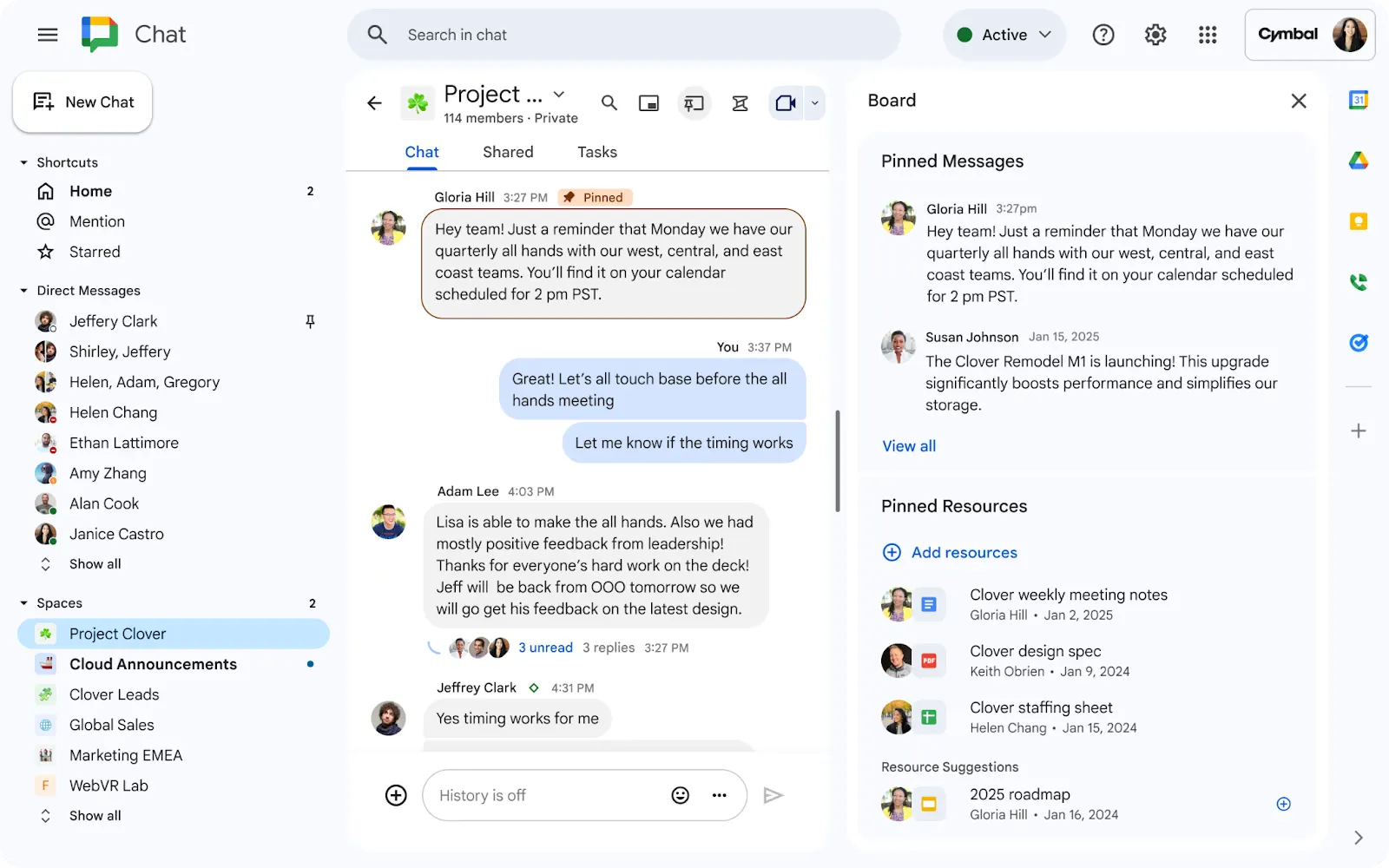
Introducing the board tab in Google Chat
Board Tab feature can be thought of as a virtual bulletin board, organizes important information and helps keep your team on the same page by enabling anyone to:
Pin and share crucial messages, files, and links for quick access
Use intelligent suggestions to find and add relevant resources quickly
Maintain an organized workspace by displaying the board next to your conversation stream when needed and hidden at other times
Availability: Available to all Google Workspace customers
Introducing the board tab in Google Chat
Board Tab feature can be thought of as a virtual bulletin board, organizes important information and helps keep your team on the same page by enabling anyone to:
Pin and share crucial messages, files, and links for quick access
Use intelligent suggestions to find and add relevant resources quickly
Maintain an organized workspace by displaying the board next to your conversation stream when needed and hidden at other times
Availability: Available to all Google Workspace customers
Create names for group direct messages in Google Chat
In order to manage discussions more easily and find conversations quicker, users can now create names for existing and new group direct messages. Read more.
Availability: Available to all Google Workspace customers

Create names for group direct messages in Google Chat
In order to manage discussions more easily and find conversations quicker, users can now create names for existing and new group direct messages. Read more.
Availability: Available to all Google Workspace customers

Create files and folders using Gemini in the side panel of Google Drive
Today, Google are excited to expand Gemini in Drive capabilities by introducing the ability to create new Google Docs, Sheets, Slides and folders in your Drive. As part of this update, they are introducing support for two new types of prompts using Gemini in the side panel. Read more.
Availability: Available to Google Workspace customers

Create files and folders using Gemini in the side panel of Google Drive
Today, Google are excited to expand Gemini in Drive capabilities by introducing the ability to create new Google Docs, Sheets, Slides and folders in your Drive. As part of this update, they are introducing support for two new types of prompts using Gemini in the side panel. Read more.
Availability: Available to Google Workspace customers

Quickly add events to Google Calendar based on your emails with Gemini in Gmail
In addition to asking Gemini in Gmail to perform calendar-related actions or answer questions about your calendar, you can now add an event to your calendar directly from an email. Read more.
Availability: Available to all Google Workspace customers

Quickly add events to Google Calendar based on your emails with Gemini in Gmail
In addition to asking Gemini in Gmail to perform calendar-related actions or answer questions about your calendar, you can now add an event to your calendar directly from an email. Read more.
Availability: Available to all Google Workspace customers

Enhancements for custom and AI-generated backgrounds in Google Meet
Google are introducing two improvements for creating custom background images with Gemini in Google Meet:
First, we’ve upgraded the image generation model, which will significantly improve the visual appeal and quality of generated backgrounds, while also better representing user requests.
Next, we’ve added several new preset styles to help you get started creating your own backgrounds.
Availability: Available for Google Workspace customers

Enhancements for custom and AI-generated backgrounds in Google Meet
Google are introducing two improvements for creating custom background images with Gemini in Google Meet:
First, we’ve upgraded the image generation model, which will significantly improve the visual appeal and quality of generated backgrounds, while also better representing user requests.
Next, we’ve added several new preset styles to help you get started creating your own backgrounds.
Availability: Available for Google Workspace customers
Scroll through live captions and translated captions in Google Meet
Google are improving the live captions and translated captions experience in Google Meet by including the ability to scroll through the text. Read more.
Availability: Available for all Google Workspace customers, as well as users with personal Google accounts

Scroll through live captions and translated captions in Google Meet
Google are improving the live captions and translated captions experience in Google Meet by including the ability to scroll through the text. Read more.
Availability: Available for all Google Workspace customers, as well as users with personal Google accounts

Easily convert data to people chips and update chip format in Google Sheets
Similar to the functionality in Google Sheets that helps you easily convert data to dropdown chips, you can now use bulk chip conversion for people chips. Read more.
Availability: Available to all Google Workspace customers, Google Workspace Individual subscribers, and users with personal Google accounts

Easily convert data to people chips and update chip format in Google Sheets
Similar to the functionality in Google Sheets that helps you easily convert data to dropdown chips, you can now use bulk chip conversion for people chips. Read more.
Availability: Available to all Google Workspace customers, Google Workspace Individual subscribers, and users with personal Google accounts
Source: https://workspaceupdates.googleblog.com/
Share To
Share To
Start with a 30-min call
Get a free
30-min AI strategy call
Free 30-minute scoping call
Engineers, not sales reps, on the call
Avg. response: under 4 hours, business days