Google Workspace Features Update: March 2024
Category
Category
Azure AI
Azure AI
Read
Read
2 min read
2 min read
Author
Author
GoPomelo Google Workspace Team
GoPomelo Google Workspace Team
Date
Date

Google Workspace Features Update Summary - March 2024
The summary of essential information about new features and improvements for Google Workspace customers in February 2024

Smooth scrolling in Google Sheets now available on desktop
Availability: Available to all Google Workspace customers, Google Workspace Individual subscribers, and users with personal Google accounts
Who’s impacted: End users
With smooth scrolling, you can scroll to a specific part of a row or column and stop wherever you’d like within the spreadsheet.
This update works with all Sheets features, such as frozen rows, hidden columns, charts, buttons, comments, on right-to-left layouts, and when you use scrollbars (instead of a mouse/trackpad). Read more.

Smooth scrolling in Google Sheets now available on desktop
Availability: Available to all Google Workspace customers, Google Workspace Individual subscribers, and users with personal Google accounts
Who’s impacted: End users
With smooth scrolling, you can scroll to a specific part of a row or column and stop wherever you’d like within the spreadsheet.
This update works with all Sheets features, such as frozen rows, hidden columns, charts, buttons, comments, on right-to-left layouts, and when you use scrollbars (instead of a mouse/trackpad). Read more.

Google Meet co-host support added for client-side encrypted meetings
Availability: Available to Google Workspace Enterprise Plus, Education Plus, and Education Standard customers
Who’s impacted: Admins and End users
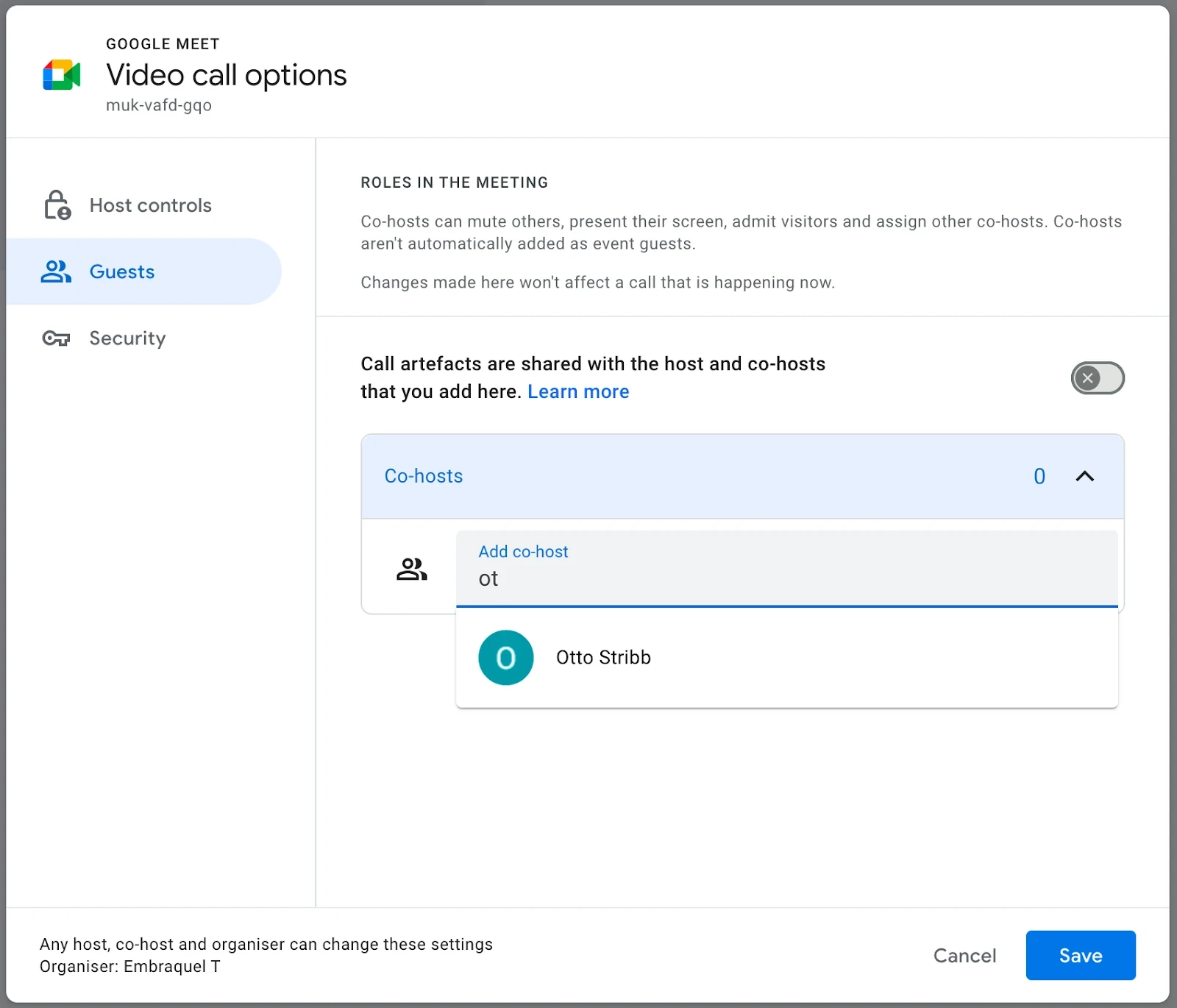
Client-side encrypted meetings are now getting support for using the co-hosts feature. This means that an organizer can plan and book client-side encrypted video meetings on behalf of other users and assign those as co-hosts to allow them to join and open the meetings independently from the organizer. Client-side encrypted meetings differ from point-to-point encrypted meetings in the way they always require a host to join first. This task can now be delegated and shared between multiple users without the organizer ever joining the call. Read more.
Google Meet co-host support added for client-side encrypted meetings
Availability: Available to Google Workspace Enterprise Plus, Education Plus, and Education Standard customers
Who’s impacted: Admins and End users
Client-side encrypted meetings are now getting support for using the co-hosts feature. This means that an organizer can plan and book client-side encrypted video meetings on behalf of other users and assign those as co-hosts to allow them to join and open the meetings independently from the organizer. Client-side encrypted meetings differ from point-to-point encrypted meetings in the way they always require a host to join first. This task can now be delegated and shared between multiple users without the organizer ever joining the call. Read more.

Import data from other messaging platforms using the Google Chat API is now generally available
Availability: Available to all Google Workspace customers
Who’s impacted: Admins and developers
Google Workspace developers registered in our Workspace Developer Preview program have been able to import user data from other messaging platforms into Google Chat using the Google Chat APIs. This functionality is now generally available to all Workspace developers and admins. Read more.
Import data from other messaging platforms using the Google Chat API is now generally available
Availability: Available to all Google Workspace customers
Who’s impacted: Admins and developers
Google Workspace developers registered in our Workspace Developer Preview program have been able to import user data from other messaging platforms into Google Chat using the Google Chat APIs. This functionality is now generally available to all Workspace developers and admins. Read more.
Set up dropdown chips more easily in Google Sheets
Availability: Available to all Google Workspace customers, Google Workspace Individual subscribers, and users with personal Google account
Who’s impacted: End users
Google is introducing an improved comments experience in Google Docs, Sheets, and Slides to help you find and take action on comments easier than ever before. While you will continue to see and interact with the comments experience you’re familiar with, you’ll also notice updates to our comment cards, icons, and more. Read more.

Set up dropdown chips more easily in Google Sheets
Availability: Available to all Google Workspace customers, Google Workspace Individual subscribers, and users with personal Google account
Who’s impacted: End users
Google is introducing an improved comments experience in Google Docs, Sheets, and Slides to help you find and take action on comments easier than ever before. While you will continue to see and interact with the comments experience you’re familiar with, you’ll also notice updates to our comment cards, icons, and more. Read more.

Create fully customized email campaigns using new layout editor tool
Availability: Available to Workspace Business Standard, Business Plus, Enterprise Standard, Enterprise Plus, Education Standard, Education Plus and Workspace Individual subscribers
Who’s impacted: End users
Today, Google announced that even more users across Google Workspace editions can now create customized email layouts using a new email layout editor that is accessible from the compose screen in Gmail or Google Drive. In the layout editor, you can create a new email layout from scratch or select from a predefined set of email templates, which include images, text elements and buttons. Read more.

Create fully customized email campaigns using new layout editor tool
Availability: Available to Workspace Business Standard, Business Plus, Enterprise Standard, Enterprise Plus, Education Standard, Education Plus and Workspace Individual subscribers
Who’s impacted: End users
Today, Google announced that even more users across Google Workspace editions can now create customized email layouts using a new email layout editor that is accessible from the compose screen in Gmail or Google Drive. In the layout editor, you can create a new email layout from scratch or select from a predefined set of email templates, which include images, text elements and buttons. Read more.
Hovercards for group messages and spaces are now available in Google Chat
Availability: Available now to all Google Workspace customers, Google Workspace Individual subscribers, and users with personal Google accounts.
Who’s impacted: End users
When hovering over a space or group chat within the left navigation in Google Chat, you will now see a hovercard that displays an abridged list of members and their avatars. This is especially useful when you need to distinguish one chat from another. In addition, you can include space hovercards across Chat apps using the shared hovercard library. Read more.

Hovercards for group messages and spaces are now available in Google Chat
Availability: Available now to all Google Workspace customers, Google Workspace Individual subscribers, and users with personal Google accounts.
Who’s impacted: End users
When hovering over a space or group chat within the left navigation in Google Chat, you will now see a hovercard that displays an abridged list of members and their avatars. This is especially useful when you need to distinguish one chat from another. In addition, you can include space hovercards across Chat apps using the shared hovercard library. Read more.
Source: https://workspaceupdates.googleblog.com
Share To
Share To
Start with a 30-min call
Get a free
30-min AI strategy call
Free 30-minute scoping call
Engineers, not sales reps, on the call
Avg. response: under 4 hours, business days