Google Workspace Features Update: May 2021
Category
Category
Azure AI
Azure AI
Read
Read
5 min read
5 min read
Author
Author
GoPomelo Google Workspace Team
GoPomelo Google Workspace Team
Date
Date

Google Workspace (formerly G Suite) Features Update Summary - May 2021
The summary of essential information about new features and improvements for Google Workspace customers in May 2021.

Specify which attributes are available for the Secure LDAP client
Edition: Available to Google Workspace Enterprise Standard, Enterprise Plus, Education Fundamentals, and Education Plus, and Cloud Identity Premium customers
Who’s impacted: Admins only
The Secure LDAP service provides a simple and secure way to connect your LDAP-based applications and services to Cloud Identity or Google Workspace. Admins can now specify which attributes they’d like to make available for the LDAP Client. Read more.
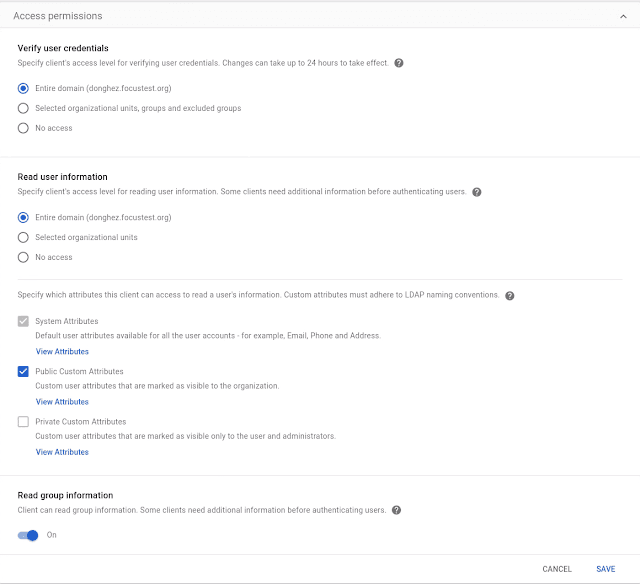
Specify which attributes are available for the Secure LDAP client
Edition: Available to Google Workspace Enterprise Standard, Enterprise Plus, Education Fundamentals, and Education Plus, and Cloud Identity Premium customers
Who’s impacted: Admins only
The Secure LDAP service provides a simple and secure way to connect your LDAP-based applications and services to Cloud Identity or Google Workspace. Admins can now specify which attributes they’d like to make available for the LDAP Client. Read more.
Google Device Policy app ending support for iOS 11 soon
Edition: All
Who’s impacted: Admins and end-users
The Google Device Policy app won’t support mobile devices running iOS version 11 or lower after August 2021. If your organization has advanced mobile device management (MDM) enabled, users must upgrade to iOS version 12 or higher to access new MDM features or to download the Device Policy app for the first time. Read more.
Google Device Policy app ending support for iOS 11 soon
Edition: All
Who’s impacted: Admins and end-users
The Google Device Policy app won’t support mobile devices running iOS version 11 or lower after August 2021. If your organization has advanced mobile device management (MDM) enabled, users must upgrade to iOS version 12 or higher to access new MDM features or to download the Device Policy app for the first time. Read more.
New iOS Data Protection setting restricts data sharing between Google Workspace and personal Google accounts
Edition: Available to Google Workspace Enterprise Standard, Enterprise Plus, and Education Plus customers
Who’s impacted: Admins and end-users
We’re adding a new admin setting that restricts data and content sharing between Google Workspace accounts and personal Google accounts in Gmail, Drive, Docs, Sheets, and Slides on iOS. Read more.

New iOS Data Protection setting restricts data sharing between Google Workspace and personal Google accounts
Edition: Available to Google Workspace Enterprise Standard, Enterprise Plus, and Education Plus customers
Who’s impacted: Admins and end-users
We’re adding a new admin setting that restricts data and content sharing between Google Workspace accounts and personal Google accounts in Gmail, Drive, Docs, Sheets, and Slides on iOS. Read more.

More options to control which holidays show on your Calendar
Edition: All
Who’s impacted: All end-users
To provide more control over your calendar, we’re adding a new option to choose which holidays to display. Previously, we showed all holidays for regions you select, including official public holidays (such as Thanksgiving in the US, or the summer bank holiday in the UK), as well as unofficial other holidays (such as Valentine's Day and Mother’s Day). Read more.
More options to control which holidays show on your Calendar
Edition: All
Who’s impacted: All end-users
To provide more control over your calendar, we’re adding a new option to choose which holidays to display. Previously, we showed all holidays for regions you select, including official public holidays (such as Thanksgiving in the US, or the summer bank holiday in the UK), as well as unofficial other holidays (such as Valentine's Day and Mother’s Day). Read more.
Google for Education transformation reports window open, available worldwide
Edition: All
Who’s impacted: Admins only
Google for Education transformation reports are available for K-12 Google Workspace for Education customers worldwide, at no additional cost (in English only at this time). The next reporting window will open on May 3, 2021. Read more.
Google for Education transformation reports window open, available worldwide
Edition: All
Who’s impacted: Admins only
Google for Education transformation reports are available for K-12 Google Workspace for Education customers worldwide, at no additional cost (in English only at this time). The next reporting window will open on May 3, 2021. Read more.

New options to control chat history in unthreaded Google Chat rooms
Edition: All
Who’s impacted: Admins only
We’re introducing a new admin control for Google Chat history in unthreaded rooms. With this new control, admins have the option to: set unthreaded room history behavior separately from 1:1 and group conversations: Admins can set the default history state to be either on or off. They can also prevent users from changing the default history setting for unthreaded rooms. Read more.
New options to control chat history in unthreaded Google Chat rooms
Edition: All
Who’s impacted: Admins only
We’re introducing a new admin control for Google Chat history in unthreaded rooms. With this new control, admins have the option to: set unthreaded room history behavior separately from 1:1 and group conversations: Admins can set the default history state to be either on or off. They can also prevent users from changing the default history setting for unthreaded rooms. Read more.
Improve Google Cloud Search results with Contextual Boost
Edition: Available to Google Cloud Search customers
Who’s impacted: Admins and end-users
We’re adding the ability to boost Google Cloud Search results using the Cloud Search Query API for third-party data sources. Contextual boost is achieved by defining document-specific context at the time of indexing and using the right contextual values at the time of query. Contextual boost is one of the key ways used to enable search personalization. Read more.
Improve Google Cloud Search results with Contextual Boost
Edition: Available to Google Cloud Search customers
Who’s impacted: Admins and end-users
We’re adding the ability to boost Google Cloud Search results using the Cloud Search Query API for third-party data sources. Contextual boost is achieved by defining document-specific context at the time of indexing and using the right contextual values at the time of query. Contextual boost is one of the key ways used to enable search personalization. Read more.
Enhance Cloud Search results for PDFs containing images with Optical Character Recognition support
Edition: Available to Google Workspace Enterprise Plus and Google Cloud Search customers
Who’s impacted: Admins and end-users
Cloud Search now supports Optical Character Recognition (OCR) based text extraction for PDFs that contain images, such as:
Physical contract documents,
Engineering documents that contain annotations or labels
Physical customer invoices, and more.
This makes PDFs with images containing text, such as scanned documents, searchable by users. Read more.
Enhance Cloud Search results for PDFs containing images with Optical Character Recognition support
Edition: Available to Google Workspace Enterprise Plus and Google Cloud Search customers
Who’s impacted: Admins and end-users
Cloud Search now supports Optical Character Recognition (OCR) based text extraction for PDFs that contain images, such as:
Physical contract documents,
Engineering documents that contain annotations or labels
Physical customer invoices, and more.
This makes PDFs with images containing text, such as scanned documents, searchable by users. Read more.

Restrict Google Drive for desktop to company-owned devices, now generally available
Edition: All
Who’s impacted: Admins only
You can now restrict the use of Google Drive for desktop to company-owned devices. This functionality was previously available in beta. Read more.

Restrict Google Drive for desktop to company-owned devices, now generally available
Edition: All
Who’s impacted: Admins only
You can now restrict the use of Google Drive for desktop to company-owned devices. This functionality was previously available in beta. Read more.

“Show Editors” in provides more context on changes made in Google Docs
Edition: All
Who’s impacted: All end-users
You can now view richer information on the edit history of a particular range of content in Google Docs. Simply highlight and right-click on a range of text and select “Show Editors” from the dropdown menu. Here, you can view a list of editors and their latest edit along with time stamps. You’ll also have the option to open the Version History of the document. Read more.

“Show Editors” in provides more context on changes made in Google Docs
Edition: All
Who’s impacted: All end-users
You can now view richer information on the edit history of a particular range of content in Google Docs. Simply highlight and right-click on a range of text and select “Show Editors” from the dropdown menu. Here, you can view a list of editors and their latest edit along with time stamps. You’ll also have the option to open the Version History of the document. Read more.
More options for customizing a charts line and fill styling in Google Sheets
Edition: All
Who’s impacted: All end-users
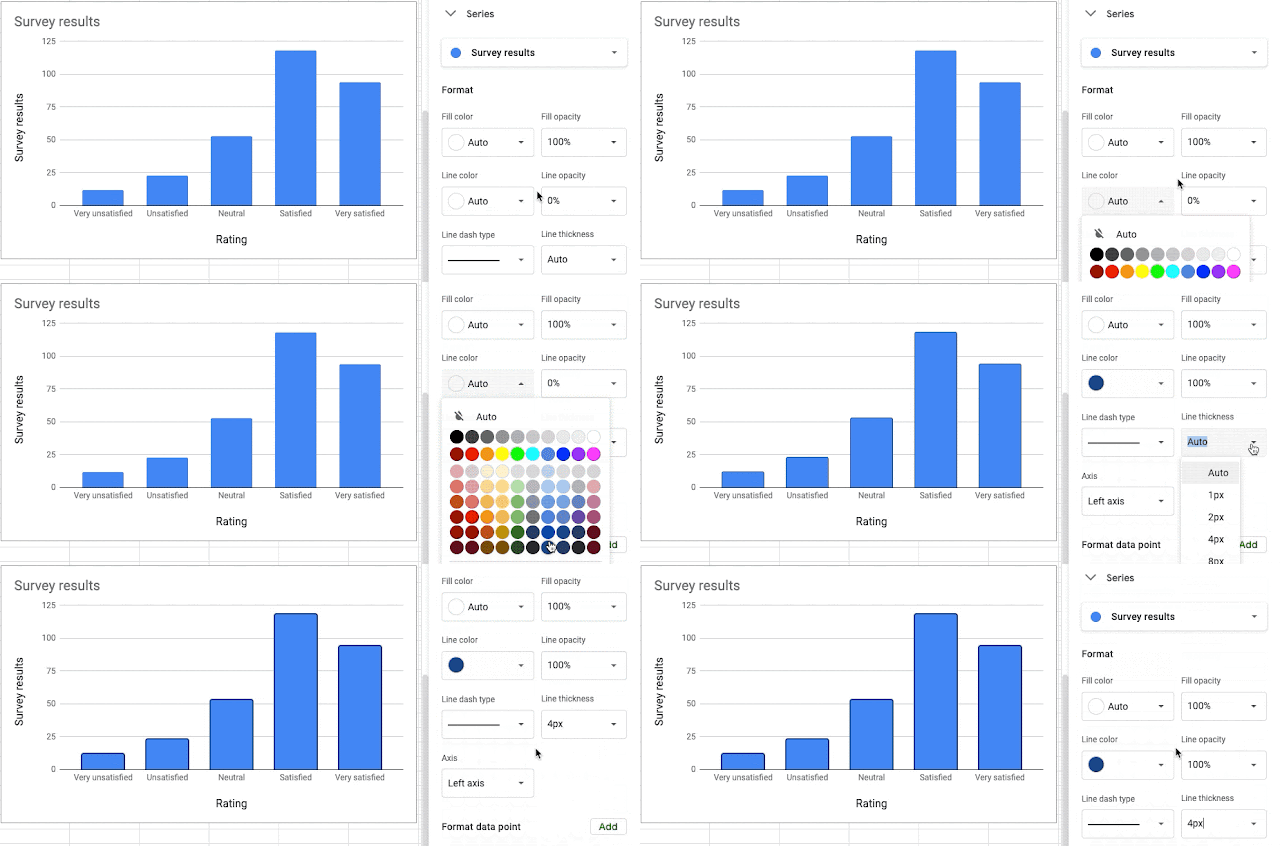
We’ve added more for line and fill customization options for series and series items. You can now modify: Color, Opacity, Line dash styles and Line thickness. For column-shaped series, we’ve added the ability to add and style borders, which is a highly requested feature. Read more.
More options for customizing a charts line and fill styling in Google Sheets
Edition: All
Who’s impacted: All end-users
We’ve added more for line and fill customization options for series and series items. You can now modify: Color, Opacity, Line dash styles and Line thickness. For column-shaped series, we’ve added the ability to add and style borders, which is a highly requested feature. Read more.
Google Docs will now use canvas based rendering: this may impact some Chrome extensions
Edition: N/A
Who’s impacted: Admins and developers
We’re updating the way Google Docs renders documents. Over the course of the next several months, we’ll be migrating the underlying technical implementation of Docs from the current HTML-based rendering approach to a canvas-based approach to improve performance and improve consistency in how content appears across different platforms. Read more.
Google Docs will now use canvas based rendering: this may impact some Chrome extensions
Edition: N/A
Who’s impacted: Admins and developers
We’re updating the way Google Docs renders documents. Over the course of the next several months, we’ll be migrating the underlying technical implementation of Docs from the current HTML-based rendering approach to a canvas-based approach to improve performance and improve consistency in how content appears across different platforms. Read more.
Create and import documents that contain images above or behind text in Google Docs
Edition: All
Who’s impacted: All end-users
You can now position an image in front of or behind text in Google Docs. Additionally, this formatting will be preserved when importing or exporting documents from Microsoft Word. We hope this feature helps you better customize your documents and share them with confidence, no matter the application you use. Read more.

Create and import documents that contain images above or behind text in Google Docs
Edition: All
Who’s impacted: All end-users
You can now position an image in front of or behind text in Google Docs. Additionally, this formatting will be preserved when importing or exporting documents from Microsoft Word. We hope this feature helps you better customize your documents and share them with confidence, no matter the application you use. Read more.
“Master” view in Google Slides renamed to “Theme Builder”
Edition: All
Who’s impacted: All end-users
We’re renaming the “Master” view in Google Slides to “Theme Builder”. This change better communicates the benefits: to help users quickly customize the font, color, and layout customization for their current theme, ensuring a consistent experience throughout the presentation. Read more.

“Master” view in Google Slides renamed to “Theme Builder”
Edition: All
Who’s impacted: All end-users
We’re renaming the “Master” view in Google Slides to “Theme Builder”. This change better communicates the benefits: to help users quickly customize the font, color, and layout customization for their current theme, ensuring a consistent experience throughout the presentation. Read more.

Check when your Google Meet meeting codes expire to ensure smooth and confident future meeting experiences
Edition: All
Who’s impacted: Admins and end-users
Google Meet meetings can be scheduled across Google Workspace products, such as Calendar, Gmail, Google Chat, and more. This means your unique meeting code and meeting code expiration is based on the product your meeting is created from. Read more.
Check when your Google Meet meeting codes expire to ensure smooth and confident future meeting experiences
Edition: All
Who’s impacted: Admins and end-users
Google Meet meetings can be scheduled across Google Workspace products, such as Calendar, Gmail, Google Chat, and more. This means your unique meeting code and meeting code expiration is based on the product your meeting is created from. Read more.
Google Meet now gives you more space for content and control over layouts for a more flexible experience
Edition: All
Who’s impacted: All end-users
Inspired by your feedback, we’re rolling out a refreshed Google Meet desktop/laptop experience with updates to video feeds, the viewing and presenting experience, and the bottom bar. Read more.

Unpin shared content
Google Meet now gives you more space for content and control over layouts for a more flexible experience
Edition: All
Who’s impacted: All end-users
Inspired by your feedback, we’re rolling out a refreshed Google Meet desktop/laptop experience with updates to video feeds, the viewing and presenting experience, and the bottom bar. Read more.
Unpin shared content
Hide your own self-feed
Hide your own self-feed

Gmail exports in Vault now include a new CSV metadata file in addition to the existing XML file
Edition: Business Plus, Frontline, Enterprise Standard, Enterprise Plus, Education Fundamentals, Education Plus, available as an add-on to Frontline, available to domain-verified Enterprise Essentials.
Who’s impacted: Admins only
Now when you create Gmail exports in Google Vault, you will get a new CSV-formatted file of the export metadata in addition to the XML file you currently receive. For Google Vault users with Admin responsibilities, this makes export processing and review easier and can save legal costs. This change improves interoperability with third-party applications. Read more.
Gmail exports in Vault now include a new CSV metadata file in addition to the existing XML file
Edition: Business Plus, Frontline, Enterprise Standard, Enterprise Plus, Education Fundamentals, Education Plus, available as an add-on to Frontline, available to domain-verified Enterprise Essentials.
Who’s impacted: Admins only
Now when you create Gmail exports in Google Vault, you will get a new CSV-formatted file of the export metadata in addition to the XML file you currently receive. For Google Vault users with Admin responsibilities, this makes export processing and review easier and can save legal costs. This change improves interoperability with third-party applications. Read more.
New Google Vault interface will become the only experience starting on May 24, 2021
Edition: Available to Google Workspace Business Plus, Enterprise Standard, Enterprise Plus, Education Fundamentals, and Education Plus, as well as G Suite Business customers and customers with the Vault add-on license.
Who’s impacted: Admins only
Last year, we announced a new interface for Google Vault. The new interface makes it easier to navigate Vault and includes new productivity features for faster task completion. See our beta blog post for more information on the improvements in the new interface. Read more.
New Google Vault interface will become the only experience starting on May 24, 2021
Edition: Available to Google Workspace Business Plus, Enterprise Standard, Enterprise Plus, Education Fundamentals, and Education Plus, as well as G Suite Business customers and customers with the Vault add-on license.
Who’s impacted: Admins only
Last year, we announced a new interface for Google Vault. The new interface makes it easier to navigate Vault and includes new productivity features for faster task completion. See our beta blog post for more information on the improvements in the new interface. Read more.

Additional admin controls for Google Voice ring groups
Edition: Available to all Google Workspace and G Suite customers with Google Voice standard and premier licenses; not available to Google Workspace and G Suite customers with Google Voice starter licenses
Who’s impacted: All end-users
We’ve added new ways for admins to manage their Google Voice ring groups. Specifically, admins can now:
Set advanced routing options, such as ringing members in a fixed order or by routing calls first to the member who least recently answered a call.
Change the maximum duration that a call should ring before proceeding to the "unanswered call" behavior — previously this was fixed at thirty seconds.

Set your Call Routing Pattern, Ring Duration, and Order of Call Ringing
Additional admin controls for Google Voice ring groups
Edition: Available to all Google Workspace and G Suite customers with Google Voice standard and premier licenses; not available to Google Workspace and G Suite customers with Google Voice starter licenses
Who’s impacted: All end-users
We’ve added new ways for admins to manage their Google Voice ring groups. Specifically, admins can now:
Set advanced routing options, such as ringing members in a fixed order or by routing calls first to the member who least recently answered a call.
Change the maximum duration that a call should ring before proceeding to the "unanswered call" behavior — previously this was fixed at thirty seconds.
Set your Call Routing Pattern, Ring Duration, and Order of Call Ringing

Setting the Call Routing Pattern to Simultaneous
Setting the Call Routing Pattern to Simultaneous
Source: https://workspaceupdates.googleblog.com
Share To
Share To
Start with a 30-min call
Get a free
30-min AI strategy call
Free 30-minute scoping call
Engineers, not sales reps, on the call
Avg. response: under 4 hours, business days