Google Workspace Update: August 2025
Category
Category
Azure AI
Azure AI
Read
Read
3 min read
3 min read
Author
Author
GoPomelo Google Workspace Team
GoPomelo Google Workspace Team
Date
Date

Google Workspace Update Summary - August 2025
The summary of essential information about new features and improvements for Google Workspace customers in August 2025
Let others easily book time with you using the new pre-configured Google Calendar booking page
Google Workspace introduces a new way to access all your booking pages directly in the Calendar sidebar. Plus, users who don’t have an appointment schedule yet will now have a pre-configured booking page. Read more.
Availability: Available to all Google Workspace customers, Workspace Individual Subscribers, and users with personal Google accounts at no additional charge.

Let others easily book time with you using the new pre-configured Google Calendar booking page
Google Workspace introduces a new way to access all your booking pages directly in the Calendar sidebar. Plus, users who don’t have an appointment schedule yet will now have a pre-configured booking page. Read more.
Availability: Available to all Google Workspace customers, Workspace Individual Subscribers, and users with personal Google accounts at no additional charge.

Catch up on unread messages within a conversation in Google Chat
You can currently use Gemini in Google Chat to summarize unread conversations in the Chat home view and to summarize files shared in conversations. To build upon this, we’re adding the ability to catch up on unread messages in direct messages, group conversations, or spaces. Read more.
Availability: Available for Google Workspace customers

Catch up on unread messages within a conversation in Google Chat
You can currently use Gemini in Google Chat to summarize unread conversations in the Chat home view and to summarize files shared in conversations. To build upon this, we’re adding the ability to catch up on unread messages in direct messages, group conversations, or spaces. Read more.
Availability: Available for Google Workspace customers

Listen to your documents using Gemini in Google Docs
Now you can create audio versions of your documents using Gemini in Google Docs. Whether you want to hear your content out loud, absorb information better while reading, or help catch errors in your writing, audio versions of your documents provide you with clear, natural-sounding voices that read your documents aloud. Read more.
Availability: Available for Google Workspace customers

Listen to your documents using Gemini in Google Docs
Now you can create audio versions of your documents using Gemini in Google Docs. Whether you want to hear your content out loud, absorb information better while reading, or help catch errors in your writing, audio versions of your documents provide you with clear, natural-sounding voices that read your documents aloud. Read more.
Availability: Available for Google Workspace customers
Use Gemini in Google Docs to generate images on Android devices
Building upon the ability to generate images using Gemini in Google Docs on web, we’re excited to announce you can now generate images in Docs on your Android mobile device. Read more.
Availability: Available to Business Standard and Plus; Enterprise Standard and Plus; Google AI Pro and Ultra, customers with the Gemini Education or Gemini Education Premium add-on, and anyone who previously purchased a Gemini Business or Gemini Enterprise add-on.

Use Gemini in Google Docs to generate images on Android devices
Building upon the ability to generate images using Gemini in Google Docs on web, we’re excited to announce you can now generate images in Docs on your Android mobile device. Read more.
Availability: Available to Business Standard and Plus; Enterprise Standard and Plus; Google AI Pro and Ultra, customers with the Gemini Education or Gemini Education Premium add-on, and anyone who previously purchased a Gemini Business or Gemini Enterprise add-on.

Ask Gemini in Google Forms to suggest new questions
Starting today, Gemini can use existing form content to suggest new relevant question types, question text, and answer options. This update helps users expand and enhance their forms by covering key points using context-specific ideas. Read more.
Availability: Available for Google Workspace customers

Ask Gemini in Google Forms to suggest new questions
Starting today, Gemini can use existing form content to suggest new relevant question types, question text, and answer options. This update helps users expand and enhance their forms by covering key points using context-specific ideas. Read more.
Availability: Available for Google Workspace customers
Quickly add events to Google Calendar with Gemini in Gmail on mobile
Earlier this year, we introduced the ability to add an event to your calendar directly from an email using Gemini in Gmail on web. Today, we’re excited to announce this is now available on Android and iOS devices. Read more.
Availability: Available to all Google Workspace customers

Quickly add events to Google Calendar with Gemini in Gmail on mobile
Earlier this year, we introduced the ability to add an event to your calendar directly from an email using Gemini in Gmail on web. Today, we’re excited to announce this is now available on Android and iOS devices. Read more.
Availability: Available to all Google Workspace customers

Full screen for screen sharing
The full-screen action appears when viewing a presentation or sharing your screen. This option increases the size of the presentation by maximizing the Meet UI and reducing the size of meeting participants using sidebar view. Read more.
Availability: Available to all Google Workspace customers, Google Workspace Individual subscribers, and users with personal Google accounts

Full screen for screen sharing
The full-screen action appears when viewing a presentation or sharing your screen. This option increases the size of the presentation by maximizing the Meet UI and reducing the size of meeting participants using sidebar view. Read more.
Availability: Available to all Google Workspace customers, Google Workspace Individual subscribers, and users with personal Google accounts
Google Meet logs will now show encryption type for call endpoints
We’re adding an additional data field for Google Meet log events: encryption_type, which will indicate whether standard cloud encryption or client-side encryption was used for a call endpoint. Read more.
Availability: Available in the audit and investigation tool for all Google Workspace customers and for select Google Workspace customers in the Security Investigation tool, as well as the Admin Reports SDK API.
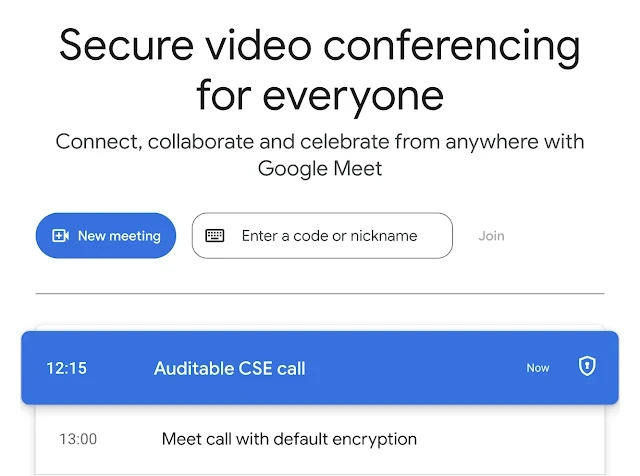
Google Meet logs will now show encryption type for call endpoints
We’re adding an additional data field for Google Meet log events: encryption_type, which will indicate whether standard cloud encryption or client-side encryption was used for a call endpoint. Read more.
Availability: Available in the audit and investigation tool for all Google Workspace customers and for select Google Workspace customers in the Security Investigation tool, as well as the Admin Reports SDK API.
Automatic Room Check-in in Google Meet with Proximity Detection
To simplify the process of joining meetings for those using companion mode on laptops within a conference room, we're introducing automatic room check-in via ultrasound proximity detection. Read more.
Availability: Available to all Google Workspace customers with Google Meet hardware devices

Automatic Room Check-in in Google Meet with Proximity Detection
To simplify the process of joining meetings for those using companion mode on laptops within a conference room, we're introducing automatic room check-in via ultrasound proximity detection. Read more.
Availability: Available to all Google Workspace customers with Google Meet hardware devices

Sorting your notes in Google Keep on Android devices
In the Google Keep app on your Android device, you can now sort your notes in the primary browse view by “date created” and “date modified. Read more.
Availability: Available to all Google Workspace customers, Workspace Individual Subscribers, and users with personal Google accounts.

Sorting your notes in Google Keep on Android devices
In the Google Keep app on your Android device, you can now sort your notes in the primary browse view by “date created” and “date modified. Read more.
Availability: Available to all Google Workspace customers, Workspace Individual Subscribers, and users with personal Google accounts.

Improving the ISEMAIL and ISURL functions in Google Sheets
Starting today, Gemini can produce fully editable charts that regenerate if the spreadsheet data changes. Read more.
Availability: Available to all Google Workspace customers, Workspace Individual Subscribers, and users with personal Google accounts
Improving the ISEMAIL and ISURL functions in Google Sheets
Starting today, Gemini can produce fully editable charts that regenerate if the spreadsheet data changes. Read more.
Availability: Available to all Google Workspace customers, Workspace Individual Subscribers, and users with personal Google accounts

Arrow keys now move an object by a pixel distance in Google Slides
When using the arrow keys to move objects in Google Slides, the object would move a great distance. To improve upon this experience, using the arrow keys to “nudge” an object will now move by 1 pixel. To improve upon this experience, the using the arrow keys to “nudge” an object will now move by 1 pixel. Read more.
Availability: Available to Google Workspace customers, Google Workspace Individual subscribers, and users with personal Google accounts.

Arrow keys now move an object by a pixel distance in Google Slides
When using the arrow keys to move objects in Google Slides, the object would move a great distance. To improve upon this experience, using the arrow keys to “nudge” an object will now move by 1 pixel. To improve upon this experience, the using the arrow keys to “nudge” an object will now move by 1 pixel. Read more.
Availability: Available to Google Workspace customers, Google Workspace Individual subscribers, and users with personal Google accounts.
Adding AI image editing features to Google Slides and Google Vids
Building upon generative image capabilities across Google Workspace, we’re excited to introduce two AI image editing features in Google Slides and Google Vids. Read more.
Availability: Available to all Google Workspace customers.

Adding AI image editing features to Google Slides and Google Vids
Building upon generative image capabilities across Google Workspace, we’re excited to introduce two AI image editing features in Google Slides and Google Vids. Read more.
Availability: Available to all Google Workspace customers.

Approval workflow for enterprise users to request access to unconfigured apps
We’re introducing a new approval workflow option for enterprise users to request access to third-party apps that have not been explicitly configured via App Access Control (AAC) by an admin. This only applies to apps that have not been configured. Read more.
Availability: Available for Google Workspace customer
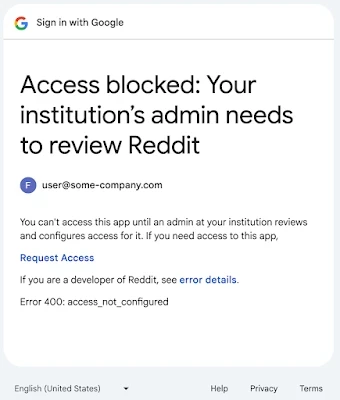
Approval workflow for enterprise users to request access to unconfigured apps
We’re introducing a new approval workflow option for enterprise users to request access to third-party apps that have not been explicitly configured via App Access Control (AAC) by an admin. This only applies to apps that have not been configured. Read more.
Availability: Available for Google Workspace customer
Source: https://workspaceupdates.googleblog.com
Share To
Share To
Start with a 30-min call
Get a free
30-min AI strategy call
Free 30-minute scoping call
Engineers, not sales reps, on the call
Avg. response: under 4 hours, business days