Microsoft 365 Insights: March 2024
Category
Category
Azure AI
Azure AI
Read
Read
1 min read
1 min read
Author
Author
GoPomelo Microsoft Team
GoPomelo Microsoft Team
Date
Date

What’s New in the Microsoft 365 app – March 2024
The summary of key updates and enhancements in Microsoft 365 in March 2024

Streamline your workflow with automation in Microsoft Loop
Ready to save time and speed up repetitive tasks? With Microsoft Loop, you can now create Power Automate-backed rules to automate time-consuming and tedious tasks—freeing you up to focus on more strategic and high-value work. Learn more.
Streamline your workflow with automation in Microsoft Loop
Ready to save time and speed up repetitive tasks? With Microsoft Loop, you can now create Power Automate-backed rules to automate time-consuming and tedious tasks—freeing you up to focus on more strategic and high-value work. Learn more.
Add context to Microsoft Loop Tables and Boards with the detail view
Each row in your Loop Tables—and each card in your Loop Boards—can now be expanded to show additional information. Whether you want to track project requirement details or checklists for each item, the detail view in Microsoft Loop makes it easy. Learn more.
Add context to Microsoft Loop Tables and Boards with the detail view
Each row in your Loop Tables—and each card in your Loop Boards—can now be expanded to show additional information. Whether you want to track project requirement details or checklists for each item, the detail view in Microsoft Loop makes it easy. Learn more.

New formatting options in Word for the web
Ready to save time and speed up repetitive tasks? With Microsoft Loop, you can now create Power Automate-backed rules to automate time-consuming and tedious tasks—freeing you up to focus on more strategic and high-value work. Learn more.
New formatting options in Word for the web
Ready to save time and speed up repetitive tasks? With Microsoft Loop, you can now create Power Automate-backed rules to automate time-consuming and tedious tasks—freeing you up to focus on more strategic and high-value work. Learn more.

A new way to animate your content in PowerPoint for the web
Find out how to animate your content, and make your slides more visually appealing and more understandable. Learn more.
A new way to animate your content in PowerPoint for the web
Find out how to animate your content, and make your slides more visually appealing and more understandable. Learn more.

Export to CSV in Excel for the web
You can now export Excel sheets as CSV files in Excel for the web, making it easier to use your data across apps and platforms. Learn more.
Export to CSV in Excel for the web
You can now export Excel sheets as CSV files in Excel for the web, making it easier to use your data across apps and platforms. Learn more.

Copilot in Forms
By simply describing to Copilot the form you’d like to build, you can speed up the creation process and increase your productivity! Learn more.
Copilot in Forms
By simply describing to Copilot the form you’d like to build, you can speed up the creation process and increase your productivity! Learn more.
Copilot in Chat
Copilot can adjust your message to add a call to action, or even to make you sound like a pirate. Soon, you will also be able to generate a new message with a prompt by typing just a few words in Teams chat. Learn more.

Adjust your message and provide a custom-rewritten version with Copilot
Copilot in Chat
Copilot can adjust your message to add a call to action, or even to make you sound like a pirate. Soon, you will also be able to generate a new message with a prompt by typing just a few words in Teams chat. Learn more.
Adjust your message and provide a custom-rewritten version with Copilot
Copilot in Meeting
When you open Copilot in the meeting chat, you will have a more comprehensive and inclusive view of what was covered in the meeting, whether it was spoken (transcript) or written (chat). Learn more.
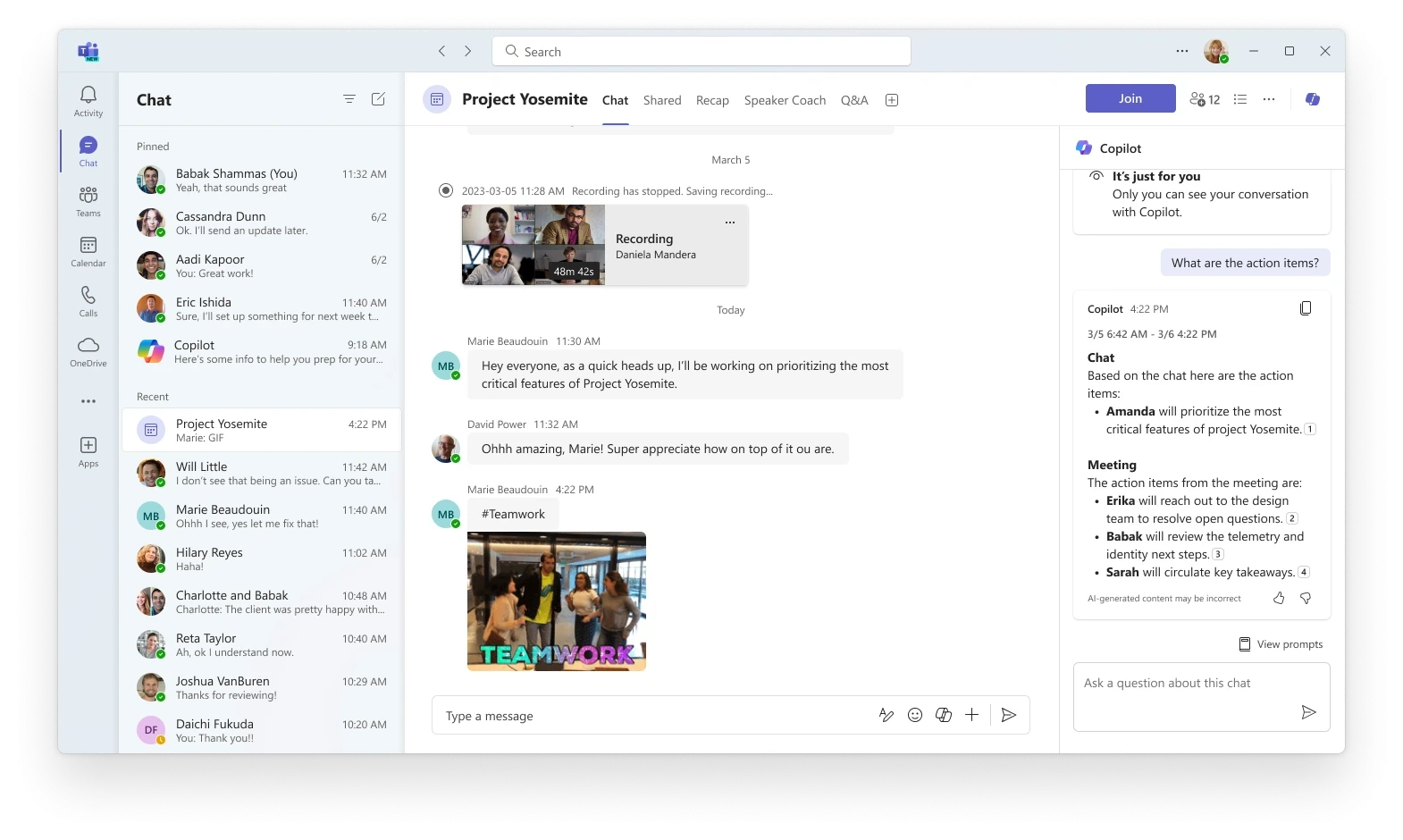
Get information and insights from the meeting chat in addition to the meeting transcript
Copilot in Meeting
When you open Copilot in the meeting chat, you will have a more comprehensive and inclusive view of what was covered in the meeting, whether it was spoken (transcript) or written (chat). Learn more.
Get information and insights from the meeting chat in addition to the meeting transcript
Source:
https://insider.microsoft365.com/en-us/blog
Share To
Share To
Start with a 30-min call
Get a free
30-min AI strategy call
Free 30-minute scoping call
Engineers, not sales reps, on the call
Avg. response: under 4 hours, business days