Microsoft 365 Insights: May - June 2025
Category
Category
Azure AI
Azure AI
Read
Read
2 min read
2 min read
Author
Author
GoPomelo Microsoft Team
GoPomelo Microsoft Team
Date
Date

What’s New in Microsoft 365: May - June 2025
The summary of key updates and enhancements in Microsoft 365 in May - June 2025

See your day at a glance with the new Calendar app
The new Calendar companion app gives you access to frequently used actions right in your taskbar. Read more.
Availability: The Calendar app is available for Windows 11 users who have Microsoft 365 desktop apps installed, are part of M365 Insiders (Beta Channel only), and are on either Enterprise or Business SKUs.

See your day at a glance with the new Calendar app
The new Calendar companion app gives you access to frequently used actions right in your taskbar. Read more.
Availability: The Calendar app is available for Windows 11 users who have Microsoft 365 desktop apps installed, are part of M365 Insiders (Beta Channel only), and are on either Enterprise or Business SKUs.

Stay in the flow with Microsoft 365 Companion apps
The People, File Search, and Calendar apps are now available to Current Channel (Preview) Insiders. Read more.
Availability: Available for Windows 11 users who have Microsoft 365 desktop apps installed, are part of M365 Insiders (Current Channel (Preview)), and are on either Enterprise or Business SKUs.

Stay in the flow with Microsoft 365 Companion apps
The People, File Search, and Calendar apps are now available to Current Channel (Preview) Insiders. Read more.
Availability: Available for Windows 11 users who have Microsoft 365 desktop apps installed, are part of M365 Insiders (Current Channel (Preview)), and are on either Enterprise or Business SKUs.
Search for templates in Word, Excel, and PowerPoint for iOS
Find the exact template you need with this new search feature! Read more.
Availability: Available to all Word, Excel, and PowerPoint for iOS users running Version 2.97 (Build 25053025) or later.

Search for templates in Word, Excel, and PowerPoint for iOS
Find the exact template you need with this new search feature! Read more.
Availability: Available to all Word, Excel, and PowerPoint for iOS users running Version 2.97 (Build 25053025) or later.

Reference PDF and TXT files when creating presentations with Microsoft 365 Copilot in PowerPoint
Bring content from a TXT or PDF file into your presentations with ease! Read more.
Availability: This feature is available to all PowerPoint for the web, PowerPoint for Windows, and PowerPoint for Mac users with an Enterprise Copilot license (learn more about licenses for businesses) and running:
Windows: Version 2409 (Build 18025.20000) or later
Mac: Version 16.88 (Build 24082514) or later

Reference PDF and TXT files when creating presentations with Microsoft 365 Copilot in PowerPoint
Bring content from a TXT or PDF file into your presentations with ease! Read more.
Availability: This feature is available to all PowerPoint for the web, PowerPoint for Windows, and PowerPoint for Mac users with an Enterprise Copilot license (learn more about licenses for businesses) and running:
Windows: Version 2409 (Build 18025.20000) or later
Mac: Version 16.88 (Build 24082514) or later
Tell engaging stories with video in PowerPoint
Incorporate video into your presentation to engage your audience. Read more.
Availability: Available to all Microsoft 365 subscribers running the latest versions.

Tell engaging stories with video in PowerPoint
Incorporate video into your presentation to engage your audience. Read more.
Availability: Available to all Microsoft 365 subscribers running the latest versions.
New Reading Order Pane in PowerPoint for Mac to make slides accessible
Use the Reading Order Pane to visualize and edit the order content is read by a screen reader. Read more.
Availability: The Reading Order Pane is available in PowerPoint for Mac for Beta Channel users running Version 16.98 (Build 25050901) or later.

New Reading Order Pane in PowerPoint for Mac to make slides accessible
Use the Reading Order Pane to visualize and edit the order content is read by a screen reader. Read more.
Availability: The Reading Order Pane is available in PowerPoint for Mac for Beta Channel users running Version 16.98 (Build 25050901) or later.
Easily caption videos in PowerPoint for Mac
You can now caption embedded videos in presentations and edit or translate the text. Read more.
Availability: The ability to caption videos in PowerPoint for Mac is available to Beta Channel users running Version 16.98 (Build 25050401) or later.

Easily caption videos in PowerPoint for Mac
You can now caption embedded videos in presentations and edit or translate the text. Read more.
Availability: The ability to caption videos in PowerPoint for Mac is available to Beta Channel users running Version 16.98 (Build 25050401) or later.

Access chats while sharing your screen in Teams meetings
You can now open the Chat window while presenting in a meeting, and it will only be visible to you. Read more.
Availability: To use this new feature, presenters need to be members of the Teams Public Preview or Microsoft 365 Targeted release and use the new Teams client on Windows or Mac.
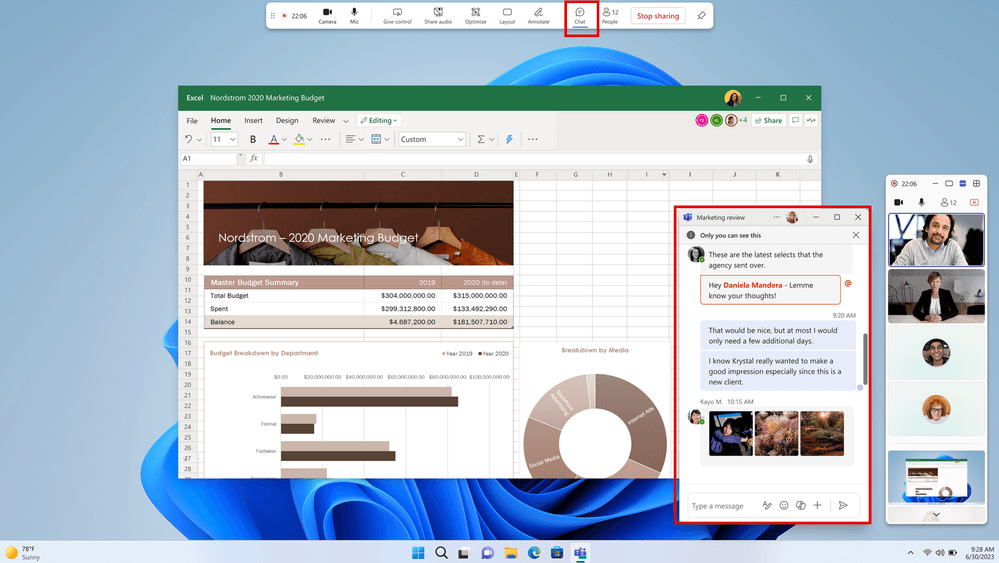
Access chats while sharing your screen in Teams meetings
You can now open the Chat window while presenting in a meeting, and it will only be visible to you. Read more.
Availability: To use this new feature, presenters need to be members of the Teams Public Preview or Microsoft 365 Targeted release and use the new Teams client on Windows or Mac.
Collaborate in real time with workspaces in Teams
Bring your collaborative documents closer to the conversation!. Read more.
Availability: This feature is currently rolling out to all Microsoft 365 subscribers who meet the requirements mentioned above.
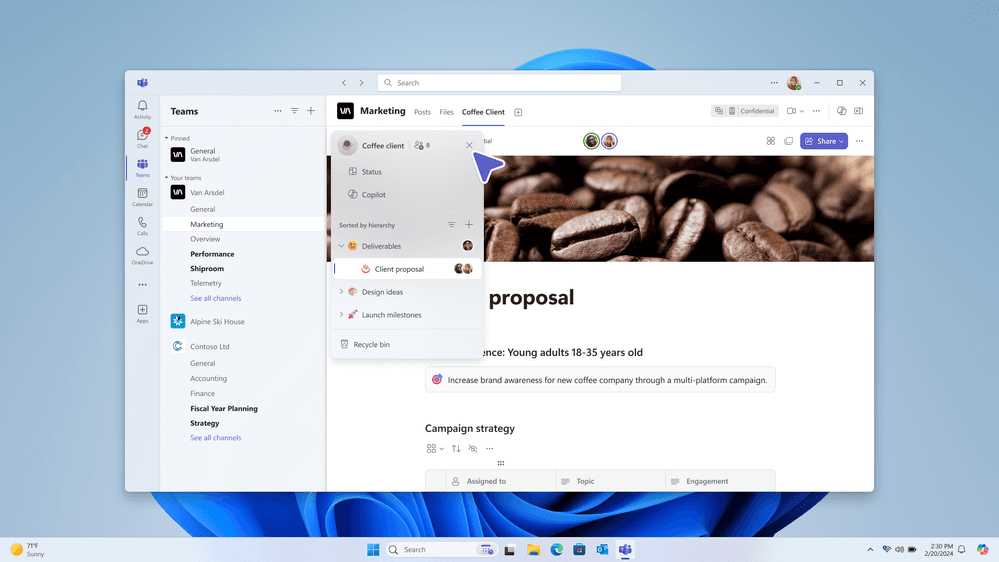
Collaborate in real time with workspaces in Teams
Bring your collaborative documents closer to the conversation!. Read more.
Availability: This feature is currently rolling out to all Microsoft 365 subscribers who meet the requirements mentioned above.

Use your voice to gather insights from your Word documents
Enjoy a new, more natural way to interact with your documents with Microsoft 365 Copilot. Read more.
Availability: This feature is currently rolling out to users meeting the requirements outlined above, and using Word for the web or running Word for Windows Version 2412 (Build 18317.20000) or later.

Use your voice to gather insights from your Word documents
Enjoy a new, more natural way to interact with your documents with Microsoft 365 Copilot. Read more.
Availability: This feature is currently rolling out to users meeting the requirements outlined above, and using Word for the web or running Word for Windows Version 2412 (Build 18317.20000) or later.
Customize your email actions toolbar in Outlook for Android and iOS
You can select which actions you used most often to remain in your toolbar in Microsoft Outlook on your mobile device. Read more.
Availability: This feature is rolling out to Outlook mobile users running:
Android: Build 4.2522.0 or later.
iOS: Build 4.2522 or later.

Customize your email actions toolbar in Outlook for Android and iOS
You can select which actions you used most often to remain in your toolbar in Microsoft Outlook on your mobile device. Read more.
Availability: This feature is rolling out to Outlook mobile users running:
Android: Build 4.2522.0 or later.
iOS: Build 4.2522 or later.

Microsoft 365 Copilot Notebooks available in OneNote on Windows
You can now access and create notebooks with Copilot that reference documents, chats, and other files. Read more.
Availability: Copilot Notebooks in OneNote on Windows is available to Enterprise customers who are running Version 2504 (Build 18827.20128) or later and meet the following requirements:
They have a Microsoft 365 Copilot license.
They have a SharePoint or OneDrive license.

Microsoft 365 Copilot Notebooks available in OneNote on Windows
You can now access and create notebooks with Copilot that reference documents, chats, and other files. Read more.
Availability: Copilot Notebooks in OneNote on Windows is available to Enterprise customers who are running Version 2504 (Build 18827.20128) or later and meet the following requirements:
They have a Microsoft 365 Copilot license.
They have a SharePoint or OneDrive license.
Source: https://techcommunity.microsoft.com/category/microsoft365/blog/microsoft365insiderblog
Share To
Share To
Start with a 30-min call
Get a free
30-min AI strategy call
Free 30-minute scoping call
Engineers, not sales reps, on the call
Avg. response: under 4 hours, business days